Fourth floor, and a change of pace. So far, everything we've built—the cable, MAC addresses, IP and routing—share a common premise, the one on which the previous article ended: the network makes no promises. An IP packet can be lost, duplicated, or arrive out of order. IP does its best and washes its hands of the rest.
Yet your 4 GB file arrives intact. Your web page displays in the correct order. Your apt upgrade never downloads a half-corrupted package without noticing it.
This miracle has a foundation: Layer 4. This is where two questions are answered that the layers below completely ignore:
- Which application is this packet for? The port.
- Is delivery guaranteed, or not? TCP versus UDP.
> The Essentials in 30 Seconds
>
> - IP delivers to a machine. Layer 4 delivers to an application. The port is the apartment number.
> - A connection consists of 4 values: source IP, source port, destination IP, destination port. It’s this quadruplet that identifies it, not just the port alone.
> - TCP guarantees (delivery, order, integrity). UDP guarantees nothing—and sometimes that’s exactly what you want.
> - The three-way handshake (SYN, SYN-ACK, ACK) doesn’t exchange any data. It establishes agreement on sequence numbers.
> - TIME_WAIT is not a bug. It’s normal for a server to have thousands of them. It’s even healthy.
> - The port is not a security measure: a service on an “inconspicuous” port ” can be found with a single scan.
> - ss -tulpn replaces netstat. Learn it.
The Port: Which Application Should It Be Delivered To?
Layer 3 knows how to deliver a packet to 192.168.1.50. Fine. But this machine is running a web server, an SSH server, a mail server, and three other things. Which one is the packet for?
IP has no idea—that’s not its job. You need a second level of addressing, inside the machine. That’s the port: a 16-bit number, ranging from 0 to 65535.
Here’s an analogy that works: the IP address is the building, and the port is the apartment number. The mail carrier (IP) takes you to the right building; the intercom (the port) points you to the right door. Without the apartment number, the mail ends up in the lobby and finds no one there.
The 65,536 ports are divided into three ranges (IANA):
| Range | Name | Usage |
|---|---|---|
| 0 – 1023 | Well-known | standard services. Reserved for root on Unix |
| 1024 – 49151 | Registered | registered applications (3306 MySQL, 8080…) |
| 49152 – 65535 | Dynamic / ephemeral | temporary source ports, randomly assigned |
The detail that has concrete security implications: on Unix, opening a port below 1024 requires root privileges. That’s why a web server runs started as root (to bind to port 80) and then sheds its privileges immediately afterward. And that’s why a non-privileged application listens on 8080 rather than 80: it isn’t allowed to do any less.
Ports You Should Know by Heart
A TSSR recognizes them without thinking—they come up in diagnostics, firewall rules, and log readings.
| Port | Service | Port | Service | |
|---|---|---|---|---|
| 20/21 | FTP | 443 | HTTPS | |
| 22 | SSH | 445 | SMB (Windows) | |
| 23 | Telnet ☠️ | 465/587 | Secure SMTP | |
| 25 | SMTP | 993 | IMAPS | |
| 53 | DNS | 995 | POP3S | |
| 67/68 | DHCP | 3306 | MySQL | |
| 80 | HTTP | 3389 | RDP | |
| 123 | NTP | 5432 | PostgreSQL | |
| 161 | SNMP | 5900 | VNC | |
| 389 | LDAP | 8080 | Alternative HTTP |
Port 53 is unique and deserves special attention because it illustrates the entire concept: DNS uses UDP for ordinary queries (fast, one question, one answer) but switches to TCP for large responses and zone transfers. One service, two transport protocols, chosen as needed. Keep this in mind: it comes up every time you debug a DNS, and it always catches those off guard who have only opened UDP on their firewall.
A connection isn’t just a port—it’s four values
This is the most common misconception about Layer 4, and correcting it unlocks everything else.
We say “the connection on port 443.” This is a misleading shorthand. A connection isn’t identified by a port, but by a quadruplet (the 4-tuple):
  Source IP  +  Source port  +  Destination IP  +  Destination port
192.168.1.10 :    51234       93.184.x.x :    443
It is the combination of these four that uniquely identifies a connection. A direct consequence of this—and one that answers a question everyone asks at some point—is:
> How does a web server handle thousands of clients on port 443 alone?
Because the destination port (443) is the same for everyone, but the source IP + source port pair differs for each client. The server doesn’t see “5,000 connections on port 443 "; it sees 5,000 distinct quadruplets. Port 443 isn’t a bottleneck—it’s just one of the four coordinates.
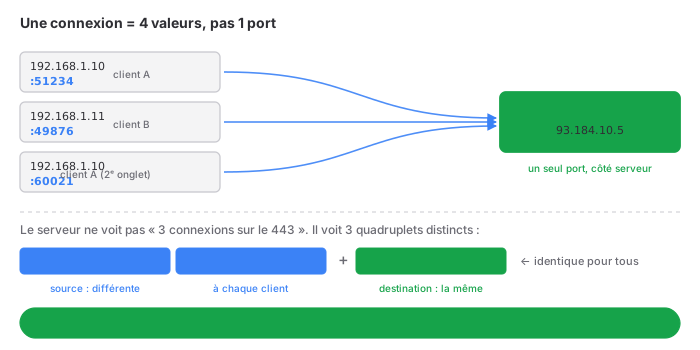
This also explains how PAT works at the Layer 3 : the router can multiplex thousands of conversations behind a single public IP address precisely because it uses the source port to distinguish them.
TCP vs. UDP: Two Philosophies
The core of Layer 4 is not “two protocols.” It is two opposing answers to the same question: should delivery be guaranteed?
TCP says yes, and pays the price for it. UDP says no, and reaps the benefits. Neither is absolutely right—they address different needs.
| TCP | UDP | |
|---|---|---|
| Connection | connection-oriented (handshake) | connectionless |
| Reliability | guaranteed, with retransmission | none |
| Order | guaranteed | none |
| Flow control | yes | no |
| Congestion control | yes | no |
| Header | 20 bytes | 8 bytes |
| Speed | slower, heavier | faster, lighter |
| Analogy | phone call | postcard |
The analogy in the last line is the most useful. TCP is a phone call: you pick up the phone, check that you can hear each other (“Hello? — Yes, I can hear you”), talk knowing the other person is listening, and hang up properly. UDP is a postcard: you write it, you mail it, and you’ll never know if it arrived—but it’s instant and costs almost nothing.
When UDP, with no guarantees, is the right choice
The beginner’s instinct is “TCP is reliable, so TCP is better.” Wrong, and here’s why.
Take a video call. An image packet gets lost. With TCP, the protocol would pause to retransmit it—and by the time it arrives, it would be half a second out of date. You’d have a perfect image… but it would be frozen, choppy, and out of sync with the audio. With UDP, the lost packet is simply discarded; the image has a micro-glitch of one-sixteenth of a second that no one notices, and the stream continues in real time.
For anything real-time, freshness takes precedence over accuracy. Delayed data is worse than missing data. This is UDP’s domain: voice (VoIP), video, online gaming, DNS (a request, a response—no need to establish a connection), and monitoring (SNMP, syslog—if a log is lost, so be it; we’re not going to slow down production over it).
The decision matrix, once and for all:
| Need | Transport |
|---|---|
| File transfer, web, email, SSH, database | TCP — integrity is non-negotiable |
| Voice, video, real-time gaming | UDP — latency is paramount |
| DNS (simple query) | UDP — one question, one answer |
| DNS (zone transfer, large response) | TCP — everything must be received in order |
| Monitoring, logs, telemetry | UDP — high volume, loss tolerable |
The three-way handshake: agreeing on the terms before communicating
TCP is “connection-oriented.” In practical terms, this means that before exchanging any useful data, the two parties negotiate. This negotiation is the famous three-way handshake, which takes place in three steps.
Three TCP header flags come into play: SYN (synchronize, I’m opening the connection), ACK (acknowledge—I acknowledge receipt), and later FIN (finish—I’m closing).
CLIENT                                      SERVER
   │                                           │
   │  ──────────  SYN (seq=x)  ─────────────▶  │   “I want to talk; my sequence number starts at x”
   │                                           │
   │  ◀────  SYN-ACK (seq=y, ack=x+1)  ──────  │   “Okay, mine starts at y; I’ve received x”
   │                                           │
   │  ──────────  ACK (ack=y+1)  ───────────▶  │   “y received—we’re synchronized”
   │                                           │
   │  ═══════════  connection established  ═══════  │
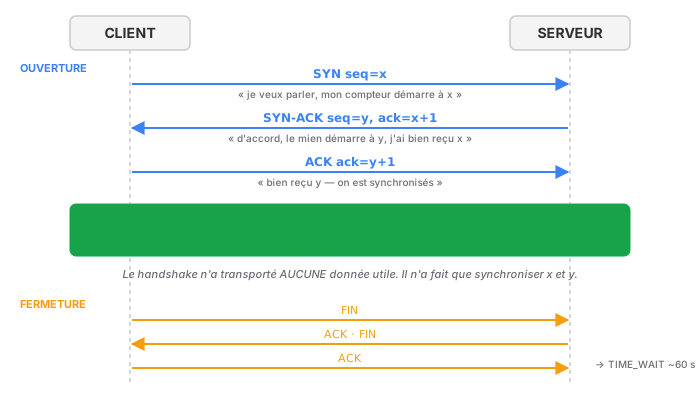
The point everyone misses: this handshake does not exchange any useful data. Not a single byte of the file, not a single character of the HTTP request. It serves only one purpose—to agree on the starting sequence numbers (x and y), randomly generated on each side.
Why are these numbers so important? Because they’re what allow us, later on, to reorder the segments and detect missing ones. Every byte sent is numbered; the receiver acknowledges receipt by saying, “I have everything up to N; send the rest.” This is the entire mechanism of TCP reliability being established right here, in these three messages. Without a handshake, there are no shared numbers; without shared numbers, there is no reliability.
The random selection of starting numbers isn’t just for show either: if they were predictable, an attacker could inject segments into an existing connection by guessing the next number. This is an old vulnerability (IP spoofing at the Layer 3 becomes harmless on TCP precisely because the sequence can no longer be guessed). Randomness is a security measure.
Closing the connection: four steps, and a phantom
Closing a TCP connection is more subtle than opening one, because each direction closes independently. It takes four messages (FIN, ACK, FIN, ACK): each party signals “I’m done transmitting” on its end, and the other acknowledges receipt.
And after the connection closes, there remains a state that confuses all beginners: TIME_WAIT. We’ll come back to this later, because it alone generates an unreasonable number of false alarms.
The States of a TCP Connection
A TCP connection is a state machine. Every connection, at any given moment, is in a specific state—and knowing how to interpret these states is key to troubleshooting. This is exactly what ss or netstat displays.
The states you need to recognize:
| State | Meaning | What It Tells You |
|---|---|---|
LISTEN |
a service is waiting for connections | the server is ready and listening |
SYN-SENT |
the client has sent its SYN, waiting for a response | it’s on its way |
SYN-RECV |
the server received a SYN, responded, and is waiting for the ACK | connection is half-open |
ESTABLISHED |
active connection, data is flowing | everything is fine |
FIN-WAIT |
one side has initiated the close | we're hanging up |
CLOSE-WAIT |
the other end has closed, not us | ⚠️ see below |
TIME_WAIT |
closed on our end, waiting for safety | normal, temporary |
Two states are diagnostic tools in and of themselves.

A large number of SYN-RECV → someone is sending SYNs without ever completing the handshake. This is the exact signature of a SYN flood (see below). A growing pile of SYN-RECV entries indicates an ongoing attack or a network that is losing ACKs.
CLOSE-WAIT piling up → and in this case, it’s almost always your application that has a bug. CLOSE-WAIT means “the other end closed the connection, and my program still hasn’t called close() .” Hundreds of frozen CLOSE-WAIT entries = an application that’s leaking sockets—it’s not closing what it opens. This isn’t a network problem: it’s a code issue. This diagnosis is worth its weight in gold, because it points the finger at the culprit while everyone else is blaming the network.
TIME_WAIT: the most common false alarm in the business
It deserves its own section, because I’ve seen it trigger “urgent” support tickets that should never have existed.
When you close a connection (the side that sends the first FIN), it doesn’t disappear. It transitions to TIME_WAIT and remains there typically for 60 seconds (2× the MSL — Maximum Segment Lifetime). During this time, the quadruplet remains reserved.
Why the wait? For two solid reasons:
- A delayed segment from the connection that just closed might still be lingering in the network. TIME_WAIT ensures that it will be recognized as belonging to the old connection, rather than mistakenly injected into a new one that would reuse the same quadruplet.
- If the last ACK is lost, the other end will retransmit its FIN—and our side needs to still be there to respond to it.
The false problem: A heavily loaded web server shows thousands of connections in TIME_WAIT. An admin discovers this, panics, and tries to “fix” it. There’s nothing to fix. This is a sign that the server is working, opening and closing connections properly at a high rate. TIME_WAIT is proof of a proper closure, not a leak.
The only case where this becomes a real issue is when ephemeral ports are exhausted on the client side, when a single machine initiates tens of thousands of outbound connections to the same destination (a proxy, a load balancer hitting a backend). In that case, we make adjustments—tcp_tw_reuse on Linux, or connection pooling on the application side, which is the real solution. But we don’t “disable " TIME_WAIT: we simply stop opening so many connections.
Remember this rule: TIME_WAIT on the server side is a sign of good health. Don’t fix it.
Flow Control and Congestion Control: TCP’s Two Brakes
TCP doesn’t just guarantee delivery. It regulates the data rate using two mechanisms that are consistently confused because they both cause the system to slow down—but for opposite reasons.
Flow control protects the receiver. A powerful server sending at full capacity can overwhelm a modest client whose receive buffer overflows. TCP prevents this via the receive window: with each ACK, the receiver signals “I have this much space left; don’t exceed it.” The sender adapts. It’s a conversation between the two ends about the receiver’s capacity to handle the data.
Congestion control protects the network. Here, the problem isn’t the receiver but everything in between: routers, links, shared bandwidth. TCP has no direct way of knowing the network’s state—so it inferred from packet loss. One lost packet = the network is probably congested = I’ll slow down. This is the well-known slow start followed by congestion avoidance logic: we accelerate cautiously, and at the slightest loss, we slam on the brakes.
The distinction, in a : flow control is “Is the other end keeping up?”; congestion control is “Is the path congested?”. Two brakes, two different sensors.
This mechanism has a huge and counterintuitive real-world consequence: even a slight packet loss disproportionately destroys TCP throughput. Because TCP interprets every loss as a congestion signal and slows down, a link that loses “only” 1 to 2% of its packets can see its throughput plummet well beyond that 2%. This is directly linked to Layer 1: a subpar cable, a poorly crimped connector, or an untwisted pair do not simply result in “slightly slower” performance. They result in a TCP throughput in free fall, without a single error message. The light is off, but the engine is stalling. That’s why we never neglect Layer 1: it comes back to haunt you at Layer 4.
The TCP Header, in a Nutshell
To put the mechanisms in the packet into context:
┌────────────────────┬────────────────────┐
│    Source port     │    Destination port       │
├────────────────────┴────────────────────┤
│         Sequence number               │
├──────────────────────────────────────────┤
│      Acknowledgment (ACK) number         │
├──────┬──────────────┬────────────────────┤
│ Offs │ URG ACK PSH  │   Window          │
│      │ RST SYN FIN  │  (flow control)│
├──────┴──────────────┼────────────────────┤
│      Checksum        │  Urgent pointer  │
└──────────────────────┴────────────────────┘
Flags are the commands for the connection. Five to know:
- SYN — opens (handshake).
- ACK — acknowledges receipt. Present on almost every segment after the first one.
- FIN — closes cleanly.
- RST — closes abruptly. “This connection doesn’t exist / is no longer valid—get lost.” This is the RST you receive when you try to connect to a closed port that is actively rejecting the connection, as opposed to the silence of a port filtered by a firewall—a crucial distinction for scanning, discussed below.
- PSH — “push this data to the application right away, don’t wait.”
The RST vs. silence behavior is one of the most useful diagnostics in the field: a closed port responds with an RST (“no one’s listening, but I’m here”); a port filtered by a firewall responds with nothing (the packet is silently discarded). This is the difference between “connection refused” (immediate) and “connection timed out” (after a long wait). The first tells you “the service is down”; the second tells you “a firewall is blocking you.” These are two radically different messages, and this is exactly what a port scanner exploits.
Layer 4 Security
Same principle as the previous layers, applied to the transport layer.
Port Scanning
The principle: Before attacking, you take stock. A port scan sends probes across a range of ports and listens for responses, specifically exploiting the RST/silence distinction discussed above.
The classic types, using nmap:
- SYN scan (
-sS, known as half-open) — sends a SYN, observes the response (SYN-ACK = open; RST = closed), and never completes the handshake. The connection isn’t established, so it’s often not logged by the application. Discreet, fast—the gold standard. - Connect scan (
-sT) — establishes the full connection. More noticeable, but does not require root privileges. - UDP scan (
-sU) — the poor relation, slow and unreliable, because UDP does not respond with “open.” The state is inferred from the absence of a response or an ICMP port unreachable (type 3, code 3 of the Layer 3 — everything overlaps).
The realistic approach: you don’t “block” a scan; you reduce the attack surface. The real principle is that the port itself isn’t a security measure—putting SSH on 2222 instead of 22 doesn’t hide it from anyone; a full scan will find it in seconds. What actually provides protection, in order: closing everything that doesn’t need to be open (a service that isn’t listening won’t be scanned), a stateful firewall that allows only what’s necessary, and strong authentication on whatever remains exposed. A non-standard port slows down opportunistic bots that only scan port 22; this is for log management convenience, not security.
The SYN Flood
The principle: The attacker exploits the handshake itself. They send thousands of SYN packets, often with a spoofed source IP, and never send the final ACK. Each SYN forces the server to allocate resources and open a half-established (the SYN-RECV state mentioned above), while waiting for an ACK that will never come. The connection table fills up with phantom connections, and the server eventually rejects legitimate connections. This is a denial-of-service attack.
Its signature is crystal clear: a mountain of SYN-RECV entries. You now know how to interpret it.
The solution: SYN cookies. The idea is clever—rather than storing every half-open connection (which is precisely the resource being depleted), the server encodes the connection state in the sequence number it returns in the SYN-ACK, which is cryptographically calculated. It allocates nothing. If a genuine ACK is received, the number it contains allows the state to be reconstructed; if it never returns (as in the case of a flood), no resources have been wasted. The server becomes immune to the flood because it has stopped keeping track of what the attacker is trying to saturate.
sysctl -w net.ipv4.tcp_syncookies=1 # enabled by default on modern Linux systems
It’s enabled by default just about everywhere today—but knowing why it works means truly understanding the handshake.
RST Spoofing (Reset Injection)
The principle: Since the RST flag immediately terminates a connection, someone capable of injecting a packet with the correct quadruplet and a plausible sequence number can cut off connections at will. This is used for censorship (cutting off connections to certain sites) and sabotage.
What makes the attack difficult today: you have to guess the current sequence number, which is random and changes quickly. What makes the attack impossible for good: end-to-end encryption (TLS), which doesn’t make the TCP connection tamper-proof—a well-placed RST still cuts it off—but ensures that data cannot be injected into the flow. Against a simple disconnection, the real solution lies at the application level: automatic reconnection, QUIC (which runs over UDP and manages its own session, bypassing the TCP RST), and monitoring.
The Toolkit
What comes in handy in real-world scenarios, and what you use every day.
See who’s listening and who’s connected
ss -tulpn        # THE command. t=tcp u=udp l=listen p=process n=numeric
ss -tan          # all TCP connections, including states
ss -s            # summary statistics by state
netstat -tulpn   # the original—still everywhere, but ss is faster
ss -tulpn is the command you need to know by heart. It instantly answers “which services are listening, on which ports, and which process is running them.” It’s the first thing to check when asking “Is this port open?” and “What’s running on this machine?”. The p (process) is what makes it indispensable: it doesn’t just tell you that port 8080 is open; it tells you which program opened it.
On Windows, the equivalent:
netstat -abno            # -b shows the executable, -o shows the PID
Get-NetTCPConnection     # the PowerShell version
Counting states — the quick diagnosis
ss -tan | awk '{print $1}' | sort | uniq -c | sort -rn
This line counts connections by state. A flood of SYN-RECV → SYN flood or ACK loss. A pileup of CLOSE-WAIT → an application leaking sockets. Thousands of TIME_WAIT → a server working hard; nothing to do. Three diagnostics in a single command line—and it’s often the first thing I type on a server that’s “running slow for no reason.”
Testing a port from the outside
nc -zv 192.168.1.50 443          # netcat: is port 443 open?
nc -zvu 192.168.1.50 53          # -u to test a UDP port
curl -v telnet://192.168.1.50:22 # view the service banner
telnet 192.168.1.50 25           # the old method, still effective
nc -zv (netcat) is the “does this port respond?” test " test stripped down to the essentials. Combined with the RST/silence diagnostic: an immediate response = open or actively denied; a long silence before the timeout = a firewall is blocking you. The duration of the failure provides valuable information.
Scanner (on YOUR network only)
nmap -sS 192.168.1.0/24          # SYN scan of the subnet
nmap -sV 192.168.1.50            # identify service versions
nmap -p- 192.168.1.50            # all 65,535 ports, exhaustive
A reminder that’s not just for show: scanning a network that isn’t yours, without written permission, is illegal. Use nmap on your personal infrastructure: learn how. Use nmap on anything else: don’t do it.
Monitoring Traffic
tcpdump -i eth0 'tcp[tcpflags] & tcp-syn != 0'   # all SYN packets — view open connections
tcpdump -i eth0 'tcp[tcpflags] & tcp-rst != 0'   # all RSTs — see connection rejections
tcpdump -i eth0 port 443                          # all traffic on a port
Wireshark filters:
tcp.flags.syn == 1 && tcp.flags.ack == 0    # only SYN packets initiating a connection
tcp.flags.reset == 1                         # RST packets — what are they resetting?
tcp.analysis.retransmission                  # ← retransmissions: loss somewhere
tcp.port == 443
The tcp.analysis.retransmission filter is a diagnostic gem. Wireshark automatically detects retransmitted segments. A lot of retransmissions = packet loss along the path, so (as we’ve seen) throughput plummets. This is the visible link between “it’s slow” and “Layer 1 or 3 is dropping packets.” When a user says “the network is slow” and everything seems normal, this filter reveals the truth.
Common Mistakes
- Believing that a connection equals a port — it’s a quadruplet. That’s why a server can handle thousands of clients on a single port.
- Thinking that TCP is always better than UDP — for real-time applications, TCP’s reliability is a flaw, not a strength.
- Wanting to “fix” TIME_WAIT — on the server side, it’s a sign of good health. The real issue is port exhaustion on the client side.
- Ignoring CLOSE-WAIT — this is almost always an application bug (unclosed socket), not a network problem.
- Confusing flow control and congestion control — one protects the receiver, the other protects the network.
- Believing that a low-profile port is a security measure — SSH on port 2222 can be found with a single scan. What provides protection is closing ports, filtering traffic, and authenticating connections.
- Opening only UDP 53 for DNS — large responses and zone transfers use TCP.
- Confusing “connection refused” and “timed out” — the former is an RST (service shut down), the latter is silence (firewall). Two opposite diagnoses.
- Still use
netstat—ssdoes the same thing faster. Reservenetstatfor machines that don’t havess.
In practice: what I’ve learned
- IP delivers to a machine; Layer 4 delivers to an application. The port is the apartment number.
- A connection is a quadruplet, not a port. All server scalability stems from this.
- TCP makes promises; UDP makes no promises. The right choice depends on the need—for real-time applications, UDP wins.
- The handshake doesn’t carry data: it synchronizes sequence numbers. This is where reliability comes from.
- States can be interpreted. A large number of
SYN-RECVs = attack or loss; a large number ofCLOSE-WAITs = application bug; a large number ofTIME_WAITs = healthy server. - RST vs. silence: active rejection versus filtering. “Refused” and “timed out” do not mean the same thing.
- Even a slight packet loss causes TCP throughput to plummet — and this directly points to the quality of Layer 1.
ss -tulpnand state counting alone account for the majority of “it’s slow for no reason” issues.
Layer 4 can therefore deliver data to the correct application, in order, without loss. We now have a reliable pipeline between two programs.
But a reliable byte pipeline isn’t yet a meaningful conversation. “GET /index.html,” “220 mail.example.fr ESMTP,” a TLS certificate being negotiated: all of this happens above, in the layers that finally give meaning to the bytes we went to such great lengths to transport.
This is the top of the stack. Coming up in future articles.