This article builds on the RJ45 guide. In that guide, we discussed copper, twisted-pair cables, and crimping: the physical layer. Here, we’re moving up a level—just one, but the one everyone skips. Between the cable and the IP address, there’s an entire layer that most people pass through without noticing it: Layer 2, the layer of MAC addresses.
And that’s a shame, because that’s where a good half of everyday network incidents are resolved, and where attacks that haven’t aged a bit in thirty years are carried out.
> The Essentials in 30 Seconds > > - The MAC address is not part of the physical layer: it’s in Layer 2 (data link). > - 48 bits: 24 manufacturer bits (OUI) + 24 serial bits. Two flag bits to know: I/G and U/L. > - ARP table (on the host) = IP → MAC. CAM table (on the switch) = MAC → port. These are not the same thing. > - A switch is not configured; it learns: source learning, flooding, aging. > - ARP has no authentication. This is a feature, not a bug—and it is the root cause of local MITM attacks. > - MAC filtering is not a security measure. The real tool is 802.1X.
Where Does a MAC Address Really Reside?
Let’s start by clearing up the most common misconception—the one that actually prompted me to write this article: no, the MAC address is not part of the physical layer.
The misunderstanding stems from a clash between two models.
In the OSI model (7 layers), it’s clear:
| Layer | Name | What resides there |
|---|---|---|
| 3 | Network | IP, routing, ICMP |
| 2 | Data Link | MAC address, Ethernet frame, VLAN, switch |
| 1 | Physical | Copper, fiber, signal, RJ45 |
In the TCP/IP model (4 layers, the one that actually describes the Internet), OSI layers 1 and 2 are merged into a single layer called “network access” or “link.” Hence the statement—technically defensible but misleading—that “ the MAC is in the TCP/IP link layer, which includes the physical layer.”
The correct way to put it: Layer 1 carries bits, Layer 2 carries frames. A MAC address is a field inside a frame. The cable doesn’t know what a MAC address is—it only recognizes voltage variations.
A small clarification for the sake of completeness: Layer 2 is itself divided into two sublayers by the IEEE 802 standard:
- LLC (Logical Link Control, 802.2)—communication with the upper layers.
- MAC (Media Access Control) — addressing and access to the shared medium.
“MAC” is therefore the name of a sublayer before it is the name of an address. “MAC address” literally means “the address used by the Media Access Control sublayer.” That clarifies a lot of things at once.
Anatomy of the 48 Bits
A MAC address is 48 bits long, or 6 bytes, and is written in hexadecimal. Three notations coexist, all of which are valid:
00:1A:2B:3C:4D:5E      ← Linux, modern Cisco IOS, de facto standard
00-1A-2B-3C-4D-5E      ← Windows
001A.2B3C.4D5E         ← Legacy Cisco (in groups of 4)
It is divided into two halves:
00:1A:2B  |  3C:4D:5E
   OUI    |    NIC
- OUI (Organizationally Unique Identifier) — the first 3 bytes. This is the manufacturer, purchased from the IEEE.
00:50:56= VMware,52:54:00= QEMU/KVM,B8:27:EB= Raspberry Pi Foundation. - NIC-specific — the last 3 octets, assigned by the manufacturer to each card.
With 24 bits for the manufacturer, that works out to ~16.7 million cards per OUI. Major manufacturers therefore purchase multiple OUI codes.
Immediate practical use: The OUI is a free diagnostic tool. Do you see an unknown MAC address on your network? Its first three bytes will already tell you whether it’s a VM, a camera, a phone, or a Raspberry Pi. This is often the first useful clue.
The Two Bits You Need to Know
It’s not all about the identifier. In the very first byte, two bits have special meaning. These are the two least significant bits:
     1st byte
  ┌───────────────┐
  x x x x x x U I      ← I/G = bit 0, U/L = bit 1
              L G
I/G (Individual/Group) bit — least significant bit of the 1st byte
0→ unicast. The frame is addressed to a single machine.1→ multicast or broadcast. The frame is addressed to a group.
U/L (Universal/Local) bit — next bit
0→ universal address, factory-set, globally unique.1→ locally administered address: someone chose it.
How to read it quickly? Look at the second hex character of the address.
| 2nd character | Meaning |
|---|---|
| 0, 4, 8, C | Unicast, universal → a real physical card |
| 2, 6, A, E | Unicast, local → VM, spoofed MAC, randomization |
| 1, 5, 9, D | Multicast, universal |
| 3, 7, B, F | Multicast, local |
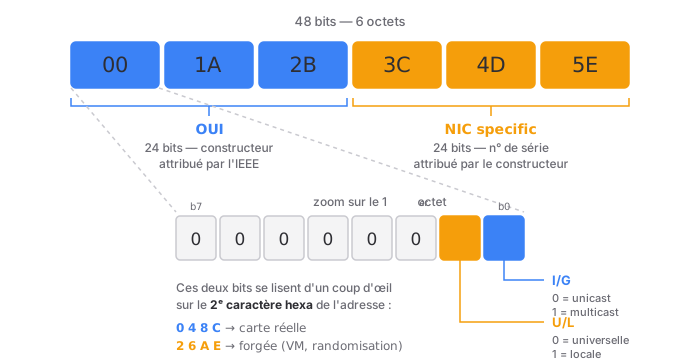
This might seem trivial. It isn’t: this is what explains why VM MACs and randomized smartphone MACs look the way they do. 02:..., 06:..., 0A:..., DA:... — as soon as the second character is even and in the list, you know that no one has bought this OUI. It’s a made-up address.
And that’s also the answer to the question, “But aren’t MACs unique worldwide?”: universal MACs are (in theory—manufacturer collisions exist, especially on low-end hardware). Local MACs, however, are not. They only need to be unique within their broadcast domain. Which is already more than enough.
Special Addresses
| Address | Role |
|---|---|
FF:FF:FF:FF:FF:FF |
Broadcast — everyone in the broadcast domain |
01:00:5E:xx:xx:xx |
Multicast IPv4 |
33:33:xx:xx:xx:xx |
Multicast IPv6 |
01:80:C2:00:00:00 |
STP (Spanning Tree) multicast |
01:80:C2:00:00:03 |
802.1X (authentication) multicast |
Broadcast is simply the extreme case of multicast: all bits are set to 1, and the I/G bit is set to 1 by definition (FF = 11111111). Makes sense.
Multicast mapping deserves a mention, because it comes up in technical interviews. A multicast IP address 224.0.0.1 must be properly mapped into a frame. How? We take the 23 least significant bits of the multicast IP address and insert them into the prefix 01:00:5E:0. Result: 01:00:5E:00:00:01.
Here’s the interesting detail: IPv4 multicast has 28 usable bits, but we only map 23 of them. Five bits are missing. As a result, 32 different IPv4 multicast groups share the same MAC address. Thisnot a bug—the card forwards the frame, and the IP stack handles the sorting—but it’s a bit of unnecessary work. IPv6 made it simpler: the 33:33 prefix followed by the last 32 bits of the IPv6 address, with no loss.
The Ethernet Frame, in a Nutshell
To put MAC addresses in context:
┌────────────┬────────────┬──────────┬─────────────────┬─────┐
│ Dest. MAC  │ Source MAC │ EtherType│     Data     │ FCS │
│  6 bytes  │  6 bytes  │ 2 bytes │  46–1,500 bytes │  4  │
└────────────┴────────────┴──────────┴─────────────────┴─────┘
Three things to remember:
- The destination comes first. This isn’t just for aesthetics: a switch can start switching as soon as the first 6 bytes are read, without waiting for the rest (this is cut-through mode).
- The EtherType indicates the content:
0x0800= IPv4,0x0806= ARP,0x86DD= IPv6,0x8100= 802.1Q-tagged frame (VLAN). Remember0x0806—it’s your go-to Wireshark filter. - The FCS is a CRC32. A corrupted frame is discarded without a word, with no retransmission. Ethernet guarantees nothing: reliability is TCP’s job, four layers higher. A faulty cable (see the article on RJ45: excessive untwisting, split pair…) therefore results in silent packet loss and a plummeting throughput, without a single explicit error message. Hence the importance of knowing how to read a switch port’s error counters.
The Switch: A Machine That Learns on Its Own
This is the point I find most poorly explained in training, and yet it is remarkably elegant.
A switch leaves the factory knowing nothing. It has no address configuration. It builds its knowledge on its own, based on three rules.
Rule 1 — Learning from the Source
For every frame it receives, the switch looks at the source MAC and notes: “This MAC is reachable via port X.” It enters this information into its CAM table (Content Addressable Memory, also called the MAC address table).
The reasoning is irrefutable: if a frame comes from port 3, then the device that sent it is connected to port 3.
Rule 2 — Switching by Destination
It then checks the destination MAC:
- Found in the table → it sends the frame to that port. And only to that port. That’s what a switch does.
- Not in the table (unknown unicast) → it sends the packet to all ports except the incoming port. This is called flooding.
- Broadcast / multicast → also flooding (multicast is refined by IGMP snooping, but that’s another topic).
Flooding raises eyebrows among beginners—“Does it behave like a hub?” ” Yes, temporarily. But it resolves itself: the destination device will respond, its reply frame will teach the switch its MAC address, and subsequent traffic will be properly switched. The switch learns as it works.
Rule 3 — Forget
Each entry has an aging timer, typically 300 seconds (5 minutes) on Cisco switches. If there’s no traffic from that MAC for 5 minutes, the entry is cleared.
Why forget? Because the table has a finite size, and above all because devices move. If a laptop is unplugged from port 3 and plugged back in at port 12, the switch must be able to track it. In practice, it doesn’t even wait the full 5 minutes: as soon as the first frame arrives from port 12, it updates the entry. The MAC address moves along with the device.
Collision Domain, Broadcast Domain
Two concepts that are consistently confused, and which regularly appear on exams:
| Collision domain | Broadcast domain | |
|---|---|---|
| Definition | Area where two simultaneous transmissions collide | Area reached by a broadcast |
| A hub | Only 1 for all ports | Only 1 |
| A switch | 1 per port | 1 for the entire switch |
| A router | 1 per interface | 1 per interface ← it blocks the broadcast |
| A VLAN | — | 1 per VLAN |
In a nutshell: A switch segments collision domains; a router (or a VLAN) segments broadcast domains. This is exactly why VLANs exist, and it’s the natural bridge to @SilenS’s article on segmentation.
ARP: The Translator Between Two Worlds
Here we are at the heart of the matter—and at the second major point of confusion to clear up.
The problem ARP solves
Your machine wants to reach 192.168.1.50. It has an IP address. But to send a frame over the cable, it needs a destination MAC address. It doesn’t have one.
ARP (Address Resolution Protocol, RFC 826) is the bridge: it translates an IP address to a MAC address, on the local network only.
It’s a strange protocol—and intentionally so: it’s not really at Layer 2, nor is it truly Layer 3. It has its own EtherType (0x0806), and it is not encapsulated in IP—it is directly within the Ethernet frame. It is generally classified as “Layer 2.5.” It serves IP, but it does not rely on IP.
The Dialogue
1. The Request — Broadcast
Source MAC: AA:AA:AA:AA:AA:AA  (me)
Dest. MAC: FF:FF:FF:FF:FF:FF  (everyone)
Content: “Who has 192.168.1.50? Reply to AA:AA:AA:AA:AA:AA”
The entire segment receives the query. Everyone processes it. It’s crude, but there’s no other way: you can’t politely ask someone whose address you don’t know.
2. The response — via unicast
Source MAC: BB:BB:BB:BB:BB:BB  (the .50 machine)
Dest. MAC: AA:AA:AA:AA:AA:AA  (only the requester)
Content: “192.168.1.50, that’s me, BB:BB:BB:BB:BB:BB”
A query to everyone, a response to just one. Note the side effect: the broadcast ARP request tells the switch where the requester is, even before a single IP frame is sent. The two mechanisms feed into each other.
3. The Cache
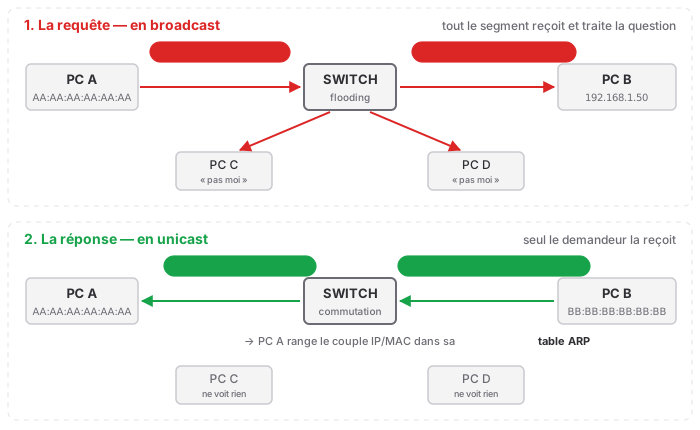
The response is stored in the ARP tableso it doesn’t have to be recalculated for every packet. Lifetime: typically a few minutes (basically ~60 s on Linux, up to ~4 h on Cisco—values vary widely; don’t memorize them, just know that they differ).
ip neigh show          # Linux — the modern command
arp -a                 # Windows, and legacy Linux
show ip arp            # Cisco IOS
ARP Table ≠ CAM Table
The table to memorize:
| ARP Table | CAM Table | |
|---|---|---|
| Where | On the host (PC, server, router) | On the switch |
| Content | IP → MAC | MAC → port |
| Role | “Which MAC address corresponds to this IP address?” | “Through which port does this MAC address exit?” |
| Layer | 2.5 (supports Layer 3) | Pure Layer 2 |
| Populated by | ARP requests | Monitoring of source MAC addresses |
| Command | ip neigh / arp -a |
show mac address-table |
A traditional (L2) switch does not have an ARP table—it doesn’t need one, since it doesn’t recognize IP addresses. An L3 switch does have one, because it routes.
The two tables work in tandem: ARP provides the MAC address, and the CAM provides the port. One without the other is useless.
And what about leaving the local network?
A classic trick question in interviews: “What MAC address do you use to reach a server on the Internet?”
Answer: the one for your gateway. ARP never crosses a router—it’s confined to the broadcast domain. For any IP address outside your subnet, your machine doesn’t request the remote server’s MAC address (that would be absurd—no one would respond); instead, it uses the gateway’s MAC address by default.
Hence the fundamental rule, the one that explains half of everything:
> Thesource IP and destination IP never change from end to end. The source and destination MAC addresses are rewritten at each router hop.

The IP address is the final recipient’s mailing address. The MAC address is the delivery truck for the current leg of the journey. At each relay, the truck is changed.
Gratuitous ARP: The One That Speaks Without Being Asked
A gratuitous ARP is an ARP frame sent without anyone having requested it: the machine spontaneously announces, “Here’s my MAC address for this IP.” Technically, it’s an ARP request where the target IP is its own IP.
Three uses, all of them important:
- IP conflict detection. Upon startup, a machine asks, “Who has my IP?”. If someone responds, there’s a duplicate. This is the cause of the Windows message “IP address conflict detected.”
- High-availability failover. This is the most interesting case. A virtual IP (VIP) managed by keepalived/VRRP switches from Server A to Server B. The IP address remains the same—but the MAC address has changed. All ARP caches on the network still point to the old server and would remain incorrect for several minutes. The new master therefore sends a gratuitous ARP broadcast: “I’m the VIP now.” The caches update instantly, the switch relearns the correct port, and the failover is transparent. Without gratuitous ARP, no Layer 2 HA would work. If you see a failover that “takes two minutes to complete ,” look into this.
- Live VM migration. Same mechanism: a VM migrating between hypervisors changes physical ports. The hypervisor sends a gratuitous ARP to notify the network.
And—you may have already seen this coming—this is also the exact mechanism behind the following attack.
–
Security: Where Things Get Interesting
All of the above share a structural flaw:
> Ethernet and ARP have no authentication whatsoever. Nothing. A frame is taken at face value.
This isn’t an oversight. It’s a design choice from the 1980s, when a local network fit within a single building and all its users were coworkers. This trust model has never been revised—it’s merely been patched up. All of the attacks described below stem from this single point.
ARP spoofing / ARP poisoning
The principle: The attacker sends fraudulent ARP responses. “The gateway’s IP address is my MAC address.” ” No one verifies this. The victims believe it and send their traffic to the attacker.
By poisoning the traffic in both directions (the victim and the gateway), the attacker positions themselves in the middle: this is the MITM (Man-in-the-Middle). He sees all the traffic passing through, relays it so that nothing seems out of the ordinary, and can read or modify it.
It’s trivial. ARP caches generally accept a response even without having sent a request (gratuitous). All you have to do is send them in a loop to permanently overwrite the real entry. The tools have been publicly available for twenty years and fit into a single command line.
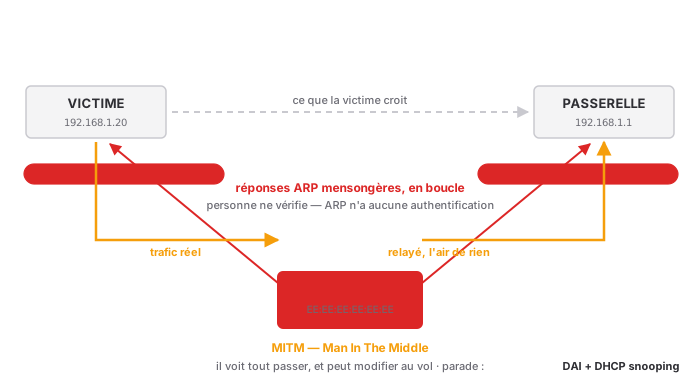
Limitations, however: It cannot cross a router or a VLAN—it’s confined to the broadcast domain. And HTTPS/SSH protect the content, provided the user doesn’t click “continue anyway” on the certificate warning. ARP spoofing is a proximity attack: the attacker must already be on the same segment.
Countermeasures:
- DAI (Dynamic ARP Inspection) — the real solution. The switch inspects ARP frames and verifies that the IP/MAC pair matches what DHCP snooping observed when the lease was assigned. An inconsistent ARP response is dropped at the port level. The attack is stopped in its tracks. DAI requires DHCP snooping to function: DHCP snooping builds the truth database.
- Static ARP entries — effective but unmanageable beyond a few critical devices.
- arpwatch / arping — doesn’t block anything, but alerts when an IP changes MAC addresses. Inexpensive to implement, and surprisingly effective.
- Segmentation — fewer devices per broadcast domain, smaller attack surface.
CAM Table Overflow (MAC Flooding)
The principle: A switch’s CAM table has a finite size (typically 8,000 to 32,000 entries on access equipment). The attacker generates a flood of frames with random MAC addresses. The switch, following its Rule No. 1, diligently learns each one. Within seconds, the table is full.
What happens then? The switch can no longer learn new entries, and, more importantly, the legitimate entries eventually get pushed out. When faced with an unknown destination, it applies rule #2: flooding. It then behaves like a hub and broadcasts all traffic to all ports. The attacker simply has to listen.
It’s a denial-of-service attack that turns into passive eavesdropping. Elegant and vicious.
The countermeasure: port-security. You limit the number of MAC addresses learned per port (often 1 or 2—2 to allow an IP phone with a PC behind it). Beyond that, the port closes (shutdown) or ignores the excess (restrict). The attack is stifled at the entry port, without ever reaching the table.
Sticky learning complements this: the switch remembers the first MAC address it sees and locks it into the configuration. Handy, but be careful—it’s unmanageable in an environment where devices move around, and it generates a flood of support tickets. Reserve this for sensitive ports.
MAC spoofing
The principle: changing your own MAC address. This is a command, not an attack:
ip link set dev eth0 address 00:11:22:33:44:55
The so-called “hard-coded” MAC address is simply a value read from the EEPROM at boot time and pushed into a register. The operating system can write to this register. It has never been immutable.
Uses: bypassing MAC filtering, spoofing the identity of an already authorized device, or simply reclaiming a DHCP lease after a network card change. This is also what your phone’s randomization feature does—completely legitimately.
MAC Filtering: The Myth to Debunk
An important point for a future TSSR, because it’s a frequent customer request and you need to know how to address it.
MAC filtering is not a security measure. The argument can be summarized in three points:
- MAC addresses are transmitted in plain text in every frame. Always. Even with WPA3: the header isn’t encrypted; only the data is.
- It only takes a few seconds of listening to capture an authorized MAC address.
- It takes just one command to use it.
MAC filtering slows down a curious intruder by three minutes. It’s an inventory check, possibly a safeguard against connection errors. It’s not a security barrier. Selling it as such is professional misconduct.
The real tool is 802.1X. With this, we no longer ask, “Who do you claim to be?” but rather, “Prove it.” The switch port remains closed until the client (supplicant) has not presented a certificate or credentials validated by a RADIUS server. The port opens only after successful authentication—and can even dynamically place the client in the correct VLAN.
The difference is fundamental: MAC filtering verifies a claim; 802.1X verifies proof.
Summary of Countermeasures
| Attack | Target | Primary Countermeasure | Prerequisites |
|---|---|---|---|
| ARP spoofing | Host ARP cache | DAI | DHCP snooping |
| CAM overflow | Switch CAM table | port-security | — |
| MAC spoofing | MAC filtering | 802.1X | RADIUS |
| Rogue DHCP | IP assignment | DHCP snooping | — |
These mechanisms form a coherent stack, and the order makes sense: DHCP snooping is the foundation (it builds the IP/MAC/port lookup table), DAI relies on it, port-security covers the flanks, and 802.1X locks the front door. They should not be deployed out of order.
MAC Randomization: When Privacy Thwarts Exploitation
A very timely topic, and one you’ll encounter in support.
The problem: Your phone, with Wi-Fi turned on, constantly transmits frames containing its MAC address. This MAC address is unique and stable. A retailer, an airport—anyone with an antenna—can therefore track you from place to place, without you even connecting to anything.
The manufacturers’ response: Starting with iOS 14 and Android 10, the phone generates a different random MAC address for each Wi-Fi network (per SSID). It remains constant within the same network—otherwise nothing would work—but changes when you move to a different one. This effectively prevents cross-location tracking. These MAC addresses are, of course, managed locally: the second hex character in 2/6/A/E. You now know how to recognize them at a glance.
What this breaks, in practice:
- DHCP reservations — the MAC changes, the lease no longer matches, and the expected static IP doesn’t arrive.
- MAC filtering — it doesn’t last five minutes (and we’ve seen how effective it was anyway).
- Captive portals — the session is lost with every rotation.
- Inventory and monitoring — a single device becomes multiple phantom devices in your tools.
What we say as technicians: We don’t ask the user to disable randomization. That’s the easy way out, and it’s the wrong one—we’re asking them to give up their privacy to compensate for an architecture built on a flawed assumption. We identify people via 802.1X (the identity, not the hardware), and we stop building anything fundamental on the stability of a MAC address.
Remember this sentence—it sums up the article: A MAC address is a transport identifier, not an identity identifier. It says “where,” never “who.”
The Toolkit
What a TSSR needs to have at their fingertips. These are the commands that come into play in real-world scenarios.
Viewing Your Own Addresses
ip link show                # Linux, modern
ip -br link show            # compact version, very readable
ipconfig /all               # Windows
show interfaces             # Cisco IOS
Viewing and Manipulating the ARP Cache
ip neigh show                              # Linux
ip neigh flush all                         # Flush—the diagnostic reflex
arp -a                                     # Windows
netsh interface ip delete arpcache         # Flush on Windows (admin)
show ip arp                                # Cisco
clear arp-cache                            # Cisco
Flushing the ARP cache is the first step when a machine can no longer reach an IP address it was able to reach five minutes ago—typically after a hardware change or a failed HA failover. If it works again after a flush, you’ve found the culprit: a stale entry.
Query the neighborhood
arping -I eth0 192.168.1.1       # which host responds for this IP?
arp-scan --localnet              # map the entire segment
arping deserves to be better known. It works even if the target’s firewall blocks ICMP—because ARP isn’t ICMP, and a machine that refuses a ping will still respond to an ARP request; otherwise, it would be unreachable. It’s the “is this machine alive on the segment?” test " that works when ping fails.
And if arping receives two different responses for the same IP: either there’s an address conflict, or someone is trying to poison your ARP table. In either case, you need to investigate.
On the switch side
show mac address-table                    # the entire CAM table
show mac address-table interface Gi0/5    # what’s behind a port
show mac address-table address 001a.2b3c.4d5e    # where is this MAC?
show port-security                        # port security status
show ip dhcp snooping binding             # the IP/MAC/port truth table
show mac address-table address <mac> is the command that answers “Where is this device physically connected? ". We start with the MAC address seen in the logs, query the switch, it returns the port, and we follow the cable. It’s detective work, and it’s very satisfying.
Wireshark
arp                    # all ARP
eth.addr == 00:1a:2b:3c:4d:5e
eth.dst == ff:ff:ff:ff:ff:ff       # all broadcasts
arp.duplicate-address-detected     # ← this one
The last filter is a godsend: Wireshark automatically detects that an IP address is being advertised with two different MAC addresses. This is the telltale sign of ARP spoofing or an IP conflict, served up on a silver platter. Knowing this saves you half an hour.
Common Mistakes
- “The MAC is in Layer 1” — no, Layer 2. Layer 1 only deals with bits.
- Confusing the ARP table and the CAM table — IP→MAC on the host, MAC→port on the switch. Two tables, two locations, two roles.
- Believing that a MAC address is immutable — it’s a modifiable register, not a permanent engraving.
- Relying on MAC filtering — it’s for inventory, not security.
- Looking up the MAC address of a remote server — outside the LAN, you use the gateway’s MAC address. ARP does not traverse a router.
- Forgetting about gratuitous ARP in HA — and wondering why the failover takes two minutes.
- Deploying DAI without DHCP snooping — DAI then has no basis for comparison. It’s useless.
- Using sticky port security everywhere — ingenious on a sensitive port, unmanageable in a shared space where people move around.
In Practice: What I’ve Learned
- Layer 2 says “where,” Layer 3 says “to whom.” The IP address passes through, while the MAC address is rewritten at each hop. If this concept is clear, the rest falls into place.
- ARP is the historical weak point, and it’s structural: no authentication, by design. Everything that follows stems from this.
- DHCP snooping first, DAI next, Port Security as a secondary measure, 802.1X at the gateway. The order matters.
- MAC filtering is not a security measure. Making this clear to the client is part of the job.
- A MAC address identifies a device, not a person. Randomization doesn’t break your network—it reveals that it was based on a false assumption.
arpingandshow mac address-table address: two commands, a huge number of diagnostic issues resolved.- Flushing the ARP cache is the first thing to do when a known IP address becomes unreachable for no apparent reason.
Thanks to @Grodjirah on the Aperturezone Discord, who suggested this topic to me, thinking there wasn’t “enough material for an article.” There actually was a bit.