Third floor. We covered cables — Layer 1. We covered MAC addresses and Layer 2.
Layer 2 has a structural limitation, and it’s brutal: it doesn’t scale. To find someone, it shouts down the hallway (broadcast). It works with thirty. With three billion, it’s a joke. And MAC addresses are flat: 00:1A:2B:3C:4D:5E tells you nothing about where the machine is located. No structure, no hierarchy, nothing to aggregate. A global router would have to know every network card on the planet, one by one.
Layer 3 solves this problem with a single idea: an address that tells you where you are. That’s it. The rest follows.
> The Essentials in 30 Seconds
>
> - An IP address isn’t just one address—it’s two: a network part + a host part. The subnet mask is the boundary. Without a subnet mask, an IP address means nothing.
> - Classes A/B/C died in 1993. We use CIDR now. If someone still talks to you about classes, they’re talking about 1992.
> - A router chooses based on longest prefix match: the most specific route always wins.
> - The TTL isn’t a time value; it’s a hop counter. It’s what makes traceroute work.
> - Blocking all ICMP breaks your network. Type 3, code 4 is vital.
> - NAT is not a security measure. The stateful firewall that goes with it, however, is.
> - 80% of “it’s not working” incidents are caused by an incorrect subnet mask, a missing return route, or an MTU issue.
IP Addresses: What Everyone Thinks They Know
An IPv4 address is 32 bits long. It’s written as four decimal numbers from 0 to 255, separated by dots—the famous dotted decimal notation. This is purely for human convenience: the machine, on the other hand, sees only 32 bits in a row.
192  .  168  .  1  .  10
11000000.10101000.00000001.00001010
This is the point I want to drive home, because it’s the key to everything that follows:
> An IP address alone means nothing. It can only be interpreted when accompanied by its subnet mask.
192.168.1.10 does not tell you which network you’re on. Nor who your neighbor is. Nor what you can reach directly. Until you’re given the subnet mask, you know nothing.
That’s why we always write 192.168.1.10/24 and never just 192.168.1.10 on its own. The /24 isn’t just for show—it’s half the information.
The subnet mask: a boundary, not a number
The subnet mask splits the 32 bits in half:
Address: 11000000.10101000.00000001.00001010   192.168.1.10
Subnet mask: 11111111.11111111.11111111.00000000   255.255.255.0  (/24)
          └────── NETWORK portion ──────┘└ HOST ┘
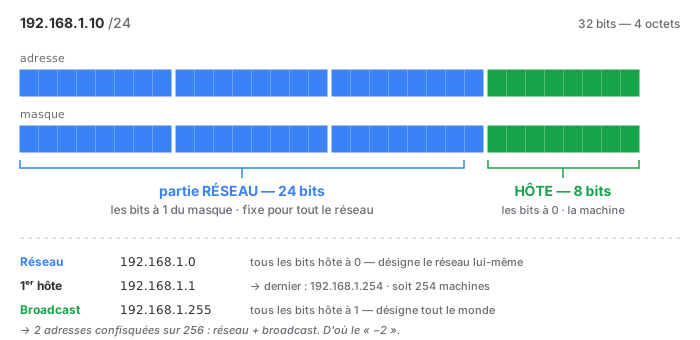
Single rule: The bits set to 1 in the mask designate the network. The bits set to 0 designate the host. And the 1s are necessarily contiguous, starting from the left. A mask with gaps (255.0.255.0) doesn’t exist—well, technically it does, but in practice it’s just as illegal as driving the wrong way down a one-way street.
Since the 1s are contiguous, you just need to count them. Hence the CIDR notation: /24 means “24 bits set to 1,” so 255.255.255.0. Both notations mean exactly the same thing.
| CIDR | Decimal mask | Host bits | Addresses | Usable hosts |
|---|---|---|---|---|
| /8 | 255.0.0.0 | 24 | 16,777,216 | 16,777,214 |
| /16 | 255.255.0.0 | 16 | 65,536 | 65,534 |
| /24 | 255.255.255.0 | 8 | 256 | 254 |
| /25 | 255.255.255.128 | 7 | 128 | 126 |
| /26 | 255.255.255.192 | 6 | 64 | 62 |
| /27 | 255.255.255.224 | 5 | 32 | 30 |
| /28 | 255.255.255.240 | 4 | 16 | 14 |
| /29 | 255.255.255.248 | 3 | 8 | 6 |
| /30 | 255.255.255.252 | 2 | 4 | 2 |
| /31 | 255.255.255.254 | 1 | 2 | 2 (special case) |
| /32 | 255.255.255.255 | 0 | 1 | 1 (one host) |
Why the “−2”? In each network, two addresses are reserved:
- The first = the network address. All host bits are 0. It refers to the network itself, not a specific machine.
192.168.1.0/24. - The last one = the broadcast address. All host bits are set to 1. It refers to all machines on the network.
192.168.1.255/24.
A /30 therefore has 4 addresses and only 2 usable—hence its historical use for point-to-point links between routers: two machines, two addresses, zero waste. Well, actually, 50% waste.
The /31 (RFC 3021) is the exception that proves the rule: on a point-to-point link, the network address and the broadcast address are meaningless (there are only two machines; they know each other). So we get to keep them: 2 addresses, 2 hosts. That’s the kind of detail that impresses in an interview.
Classes A, B, C: Time to Retire Them
We need to talk about this because it’s still being taught—even in 2026, even in reputable training programs.
Before 1993, the network portion of an IP address was derived from the first octet:
| Class | 1st byte | Default subnet mask | Verdict |
|---|---|---|---|
| A | 1–126 | /8 | historical |
| B | 128–191 | /16 | historical |
| C | 192–223 | /24 | historical |
| D | 224–239 | — | multicast, still valid |
| E | 240–255 | — | reserved |
The system was rigid and wasted space outrageously: a company with 300 machines had to use a Class B (65,534 addresses) because a Class C (254) wasn’t enough. 65,000 addresses tied up for 300 machines.
CIDR (RFC 1519, 1993) did away with the classes. You choose the subnet mask you want, regardless of the first octet. 10.0.0.0/24 is perfectly valid, even though the “10” is in “ Class A.”
What remains true: Classes D (multicast) and E (reserved) are still in use. Classes A, B, and C are now just a memory. But they persist in the default subnet masks that some tools still suggest when you enter an IP address—Windows being the prime example. This isn’t a rule; it’s a lazy suggestion left over from 1992. Don’t just accept it.
The ranges you need to know by heart
| Range | Name | What it’s used for |
|---|---|---|
10.0.0.0/8 |
RFC 1918 | private — large infrastructure networks |
172.16.0.0/12 |
RFC 1918 | private — 172.16 through 172.31, not 172.32 |
192.168.0.0/16 |
RFC 1918 | private — small networks, routers, personal infrastructure |
127.0.0.0/8 |
Loopback | yourself. The entire /8, not just .0.0.1 |
169.254.0.0/16 |
APIPA / link-local | DHCP did not respond |
100.64.0.0/10 |
CGNAT (RFC 6598) | your ISP’s NAT |
224.0.0.0/4 |
Multicast | former Class D |
0.0.0.0/0 |
Default route | “everything else” |
Two common pitfalls:
172.16.0.0/12ends at172.31.255.255, not at172.16.255.255. The/12covers 16/16blocks. Many people reserve only172.16.x.xand make the mistake of thinking that172.20.x.xis public. It isn’t.169.254.x.xis an error message in disguise. If a machine has this address, it did not receive a DHCP lease. It assigned it to itself, for lack of a better option. Look no further: cable, VLAN, DHCP server,ip helper-address. This is one of the quickest diagnostics in the business—an IP address that is its own symptom.
The IP packet: the fields that really matter
The IPv4 header is at least 20 bytes long. It contains a dozen fields. Four of them actually matter in day-to-day work.
┌──────────┬──────────┬────────────────────────────────┐
│ Version  │   IHL    │  DSCP/ECN  │   Total Length  │
├──────────┴──────────┼──────────┬─────────────────────┤
│   Identification    │  Flags   │  Fragment offset    │
├──────────┬──────────┼──────────┴─────────────────────┤
│   TTL    │ Protocol │      Header checksum           │
├──────────┴──────────┴────────────────────────────────┤
│              SOURCE IP address (32 bits)             │
├──────────────────────────────────────────────────────┤
│           DESTINATION IP Address (32 bits)           │
└──────────────────────────────────────────────────────┘
TTL — the smartest field in computing
TTL = Time To Live. The name is misleading: it’s not a time. It’s a hop counter.
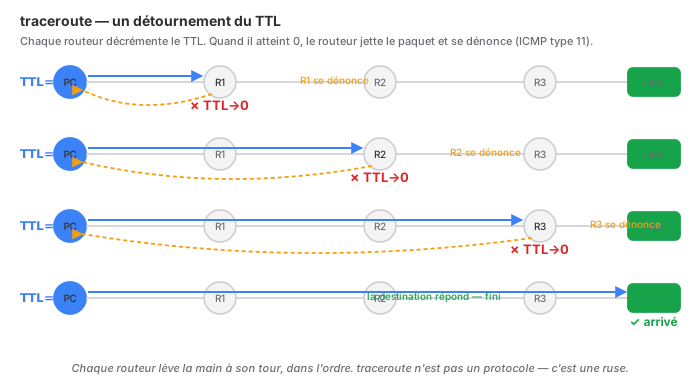
The mechanism can be summed up in two lines: each router the packet passes through decrements the TTL by 1. If the TTL reaches 0, the router discards the packet and sends an ICMP Time Exceeded (type 11) back to the sender.
Why? Because a routing loop is always possible: R1 thinks the packet is coming from R2, and R2 thinks it’s coming from R1. Without TTL, the packet would travel back and forth forever, and the link would become saturated in a matter of seconds. TTL acts as a circuit breaker: at worst, the packet dies after N hops. A looped network with TTL is a network that loses packets. Without TTL, it’s a network that collapses.
The initial values give away the OS—it’s free fingerprinting:
| Initial TTL | System |
|---|---|
| 64 | Linux, macOS, *BSD |
| 128 | Windows |
| 255 | Routers, network equipment |
You ping a machine and get a TTL of 122? Starting at 128, so Windows, and 6 routers were traversed. You’ve just learned the OS and the distance without sending anything other than a ping.
And here’s the genius of it: that’s exactly how traceroute works. You send a packet with TTL = 1. The first router decrements it to 0, discards it, and reveals itself by sending back a Time Exceeded response. We note its IP address. We start over with TTL = 2: the second router reports itself. Then 3, 4, 5… Every router along the path is forced to raise its hand, in order. traceroute is not a protocol—it’s an elegant hack of an anti-loop mechanism.
Protocol — which is above
A byte that identifies the content. The equivalent of the EtherType in Layer 2, one layer higher.
| No. | Protocol |
|---|---|
| 1 | ICMP |
| 6 | TCP |
| 17 | UDP |
| 47 | GRE |
| 50 | ESP (IPsec) |
| 89 | OSPF |
| 112 | VRRP |
These numbers are used every day in ACLs and firewall rules. Remember 1, 6, and 17. Remember 50 when you’re working with IPsec—and keep in mind that ESP does not have a port number, which explains why it doesn’t pass through NAT very well. But that’s another story.
Fragmentation, MTU: The Topic That Ruins Your Day
The MTU (Maximum Transmission Unit) is the maximum size of a packet on a link. On Ethernet: 1,500 bytes. This is a Layer 2 value that constrains Layer 3—one of the few leaks between layers.
A packet that’s too large for the next link has two possible outcomes:
- DF (Don’t Fragment) bit set to 0 → the router fragments the packet. The packet is split into pieces and reassembled only at the final destination.
- DF bit set to 1 → the router discards the packet and sends back an ICMP Destination Unreachable — Fragmentation Needed (type 3, code 4), specifying the MTU that would fit.
It is this second case that matters, because everyone sets DF to 1 : Modern TCP uses PMTUD (Path MTU Discovery). It sends a large packet with DF set, waits to be told “too big, try 1400,” and adapts.
And here’s the problem. An overzealous administrator blocks “all ICMP” on their firewall, because “ICMP is ping, and ping is dangerous.” The Type 3, Code 4 message ever reach the sender. The sender doesn’t know that its packets are too big. It keeps sending them. They keep getting dropped. Silently.
The symptom is legendary, and it looks like black magic:
- ping works (small packet ✓)
- SSH connects, the prompt appears (small packets ✓)
- SSH freezes as soon as you type
ls -lin a large directory (large packet ✗) - the website loads the HTML but never the images
- “It works over Wi-Fi but not over the VPN”
This is called a PMTUD black hole. You can diagnose it with two commands:
ping -M do -s 1472 8.8.8.8        # Linux: DF + 1472 bytes = 1500 with headers
ping -f -l 1472 8.8.8.8           # Windows: equivalent
You decrease the size until it passes: this gives you the actual MTU of the path. If 1472 fails and 1400 succeeds, your effective MTU is somewhere in between—typically a VPN, an IPsec tunnel, or PPPoE that takes up extra space.
| Context | Effective MTU |
|---|---|
| Standard Ethernet | 1500 |
| PPPoE (ADSL/carrier fiber) | 1492 |
| IPsec tunnel | ~1400 |
| WireGuard | 1420 |
| Jumbo frames (SAN, backup) | 9000 |
The workaround when you don’t control the path: MSS clamping. The router dynamically rewrites the MSS announced by TCP when the connection is established, forcing both ends to send smaller packets. It’s a workaround—but it’s a workaround that saves the day for site-to-site VPNs.
Routing: How a Router Makes Decisions
A router does only one thing, but it does it millions of times per second: check the destination IP, consult its table, forward. Period.
The Routing Table
ip route show                    # Linux
route print                      # Windows
show ip route                    # Cisco
On a typical Linux machine:
default via 192.168.1.1 dev eth0 proto dhcp metric 100
192.168.1.0/24 dev eth0 proto kernel scope link src 192.168.1.10
10.8.0.0/24 via 192.168.1.254 dev eth0
Three lines, three types:
default=0.0.0.0/0= everything else. The fallback route.192.168.1.0/24 dev eth0= the directly connected network. Novia: we’re on it, so we route directly (via ARP; see the Layer 2 article).10.8.0.0/24 via …= an explicit route to a remote network.
Longest Prefix Match — THE Rule
A packet destined for 10.8.0.42 may match multiple routes at once. Which one wins?
> The most specific one. The one with the longest subnet mask. Always.
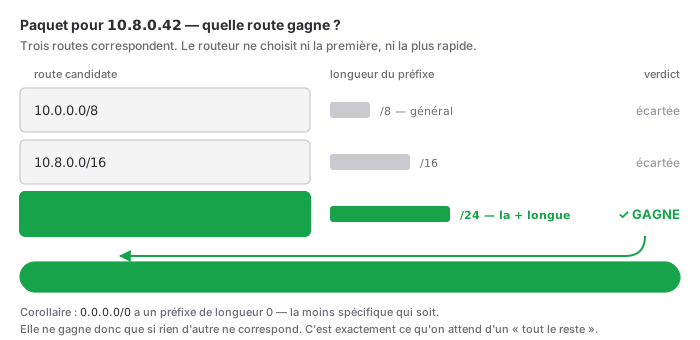
Not the first one found, not the least costly, not the most recent: the longest. A /24 beats a /16, which beats a /8, which beats the default /0.
This is what makes hierarchical routing possible: we announce a broad, general route, and then refine it locally with more specific routes that, by design, take precedence. There’s no need to manage priority—specificity is the priority.
Useful corollary: 0.0.0.0/0 has a mask length of zero. It is the least specific route that can exist. Therefore, it wins only if no other route matches. This is exactly what we want from an “all others ” route.
And here’s the command that answers the question directly, without requiring you to read the table:
ip route get 8.8.8.8
# 8.8.8.8 via 192.168.1.1 dev eth0 src 192.168.1.10 uid 1000
It gives you the kernel’s verdict: which route, which interface, which source IP. This is the first command I use when something goes to the wrong place. It settles the debate in a second.
Metric and Administrative Distance
Two routes of the same length to the same destination? Only then do we break the tie:
- Administrative distance (Cisco concept) — how much we trust the source of the information. The lower it is, the better.
- Metric — the cost, within the same protocol.
| Source | Administrative Distance |
|---|---|
| Connected | 0 |
| Static | 1 |
| eBGP | 20 |
| OSPF | 110 |
| RIP | 120 |
| iBGP | 200 |
The order makes sense: “I see it with my own eyes” (0) beats “a human told me” (1), which beats “a protocol calculated it for me” (110). Trust decreases with distance from the source.
Static or dynamic?
Static routing — you enter the routes manually.
- ✅ Predictable, zero CPU usage, no protocols to secure
- ❌ No adaptability: if a link goes down, the route remains, and traffic goes nowhere
Dynamic routing — routers communicate with each other.
| Protocol | Type | Metric | Scope |
|---|---|---|---|
| RIP | distance vector | number of hops (max 15) | obsolete |
| OSPF | link-state | cost (bandwidth) | the enterprise standard |
| BGP | path-vector | policy | Internet, carriers |
In practice, for a TSSR: the vast majority of SMBs run on static routing, and that’s perfectly fine. A few routes, one default route—that’s it. OSPF comes into play when there are multiple sites and redundancy. BGP is used when there are multiple carriers—and at that point, it’s no longer up to you.
The right question isn’t “static or dynamic?” but “do I have redundant paths?” Without redundancy, dynamic routing adds nothing but complexity and a surface area for attack.
The Return Path—Mistake #1
This is the one I see most often, across all skill levels. Take this to heart:
> Routing is never configured in just one direction. A packet that leaves must be able to return—and it doesn’t necessarily come back the way it came.
The scenario: You add a route on Router A to Network B. You test it. The ping doesn’t go through. You triple-check your route. It’s perfect. It’s perfect. The packet reaches its destination just fine.
It’s the return path that has no route. The target machine receives your ping, wants to respond, checks its table, finds nothing for your network, and sends the response to its default gateway—which doesn’t want it.
The rule of thumb: if you’re seeing “it goes out but doesn’t come back,” stop looking at your end. Run tcpdump on the target machine: if you see the packets arriving, your outbound connection is 100% fine, and the problem lies elsewhere—the return path or a local firewall. This single test narrows the problem down by half and saves hours.
A variation on this pitfall: two default gateways on a machine with multiple interfaces. Two 0.0.0.0/0 entries, only one of which is active, and seemingly random behavior. A machine has only one default gateway. If you need two, what you want are specific routes plus a single default route.
ICMP: It’s Not “Ping”
A terminology mistake with very real consequences. ICMP is not ping. Ping is one use of ICMP. ICMP is the Layer 3 error signaling system—the way the network tells you what’s wrong.
| Type | Name | What it means |
|---|---|---|
| 0 | Echo Reply | the response to a ping |
| 3 | Destination Unreachable | it didn’t get through — the code specifies why |
| 5 | Redirect | “try this route instead” |
| 8 | Echo Request | the ping request |
| 11 | Time Exceeded | TTL expired — the traceroute engine |
Type 3 is an entire family, and the code speaks for itself:
| Code | Meaning | What it tells you |
|---|---|---|
| 0 | Network Unreachable | routing problem |
| 1 | Host Unreachable | routing OK, the machine isn’t responding to the ARP |
| 3 | Port Unreachable | the machine is there, nothing is listening on that port |
| 4 | Fragmentation Needed | MTU—the vital message |
| 13 | Communication Administratively Prohibited | a firewall kicked you out |
These codes are a godsend. “Destination unreachable” means nothing; “destination unreachable, code 3” means “your routing is perfect, your service is down.” Two opposite diagnoses, just one digit apart. Read the codes.
Should ICMP be blocked?
Short answer: no. Long answer: no, but.
The argument that “ICMP lets attackers discover my network” is valid but weak: an attacker who’s already on your segment doesn’t need ICMP to map your network—a TCP scan does the job, and ARP works even better (see Layer 2). You’re depriving yourself of a diagnostic tool just to slow down someone who’s already inside by thirty seconds.
And most importantly, blocking all ICMP breaks things—without error messages, with delayed effects—and no one will make the connection three months later:
- Type 3, code 4 blocked → PMTUD black hole. The nightmare described above.
- Type 11 blocked → no more
traceroute. You’re blind to your own routes. - Type 3 code 3 blocked → connections to a closed port time out instead of being immediately rejected. Your applications struggle instead offail cleanly.
The reasonable approach: Filter incoming echo requests (type 8) from the Internet if it makes you feel better—it’s the only one worth blocking. Let types 3 and 11 pass in both directions. These aren’t requests; they’re error messages: blocking them is like unplugging the low-oil light so you don’t see it come on anymore.
NAT: Essential, Yet Misunderstood
NAT = Network Address Translation. A router rewrites the IP addresses in the packets passing through it.
Why It Exists
IPv4 has 4.3 billion addresses. That’s long since been exhausted. NAT allows 200 machines to share a single public IP address. It’s a workaround—one so effective that it has delayed the adoption of IPv6 by twenty years.
The Three Types
| Type | What Is Rewritten | Use |
|---|---|---|
| SNAT (source) | the source IP, on outgoing traffic | your devices to the Internet |
| DNAT (destination) | the destination IP, on incoming traffic | to expose an internal server |
| PAT / NAT overload | source + port | what your router does |
PAT accounts for 99% of real-world cases. The router doesn’t just rewrite the IP address—it also changes the source port and maintains a mapping table.
Internal                     External (as seen from the Internet)
192.168.1.10:51234    →     93.20.1.5:40001
192.168.1.11:51234    →     93.20.1.5:40002
192.168.1.12:33445    →     93.20.1.5:40003
A response arrives on port 40002 → the router consults its table → it’s for 192.168.1.11:51234. The port becomes the distinguishing factor. A single public IP address, 65,000 simultaneous connections.
Note the layer leak. NAT is presented as a Layer 3 mechanism, but PAT manipulates TCP/UDP ports, which are Layer 4. NAT blithely violates the layered model. That’s actually whyit breaks so many protocols: anything that embeds an IP address in the data (SIP, active FTP, IPsec ESP) becomes inconsistent, and we end up with patches upon patches (ALG helpers, NAT-T).
NAT Is Not Security
This needs to be stated clearly, because it’s a deeply held belief—even among serious people.
The argument goes: “My machines are on the 192.168.x.x network; they’re unreachable from the Internet, so I’m protected.” ”
What provides protection isn’t address translation—it’s the state table. The router lets a response through because it corresponds to a conversation that you initiated. This is stateful filtering, and it works perfectly well without NAT.
Proof by example:
- A DNAT or port forwarding bypasses NAT with a single configuration line.
- UPnP lets any application open ports on its own, without asking for your permission. On many routers, it’s enabled by default.
- NAT doesn’t filter anything at all on the outgoing side. A compromised device establishes a connection to the outside world, and NAT rolls out the red carpet for it—that’s exactly what every reverse shell on Earth does.
- NAT doesn’t see what’s happening inside your network. Zero lateral protection.
The correct way to put it: NAT is a mechanism for address conservation that, as a side effect, behaves like stateful filtering. Confusing this side effect with the intended purpose is what leads people to say, “I don’t need a firewall; I have NAT.” That’s wrong, and it’s exactly the same line of reasoning we saw at Layer 2 with MAC filtering: mistaking an operational mechanism for a security measure.
Layer 3 Security
Like Layer 2, Layer 3 was designed for use among trusted parties. Same causes, same effects.
IP spoofing
The principle: The source IP address of a packet is a text field. Nothing verifies it. You can write whatever you want.
The limitation: if you lie about your source, responses will go to the actual owner of that IP address, not to you. Spoofing is therefore useless for establishing a TCP connection (you’d have to guess the sequence number, which is no longer realistic). It remains a formidable tool for anything unidirectional: UDP, floods, and especially amplification.
The amplification scheme: I send a small DNS or NTP request by spoofing your IP. The server responds—and its response, much larger than the request, is sent to you. Multiplied by thousands of servers, you end up taking a DDoS attack that I didn’t have to pay for. The amplification factor reaches several dozen. This is the kind of traffic you eventually learn to recognize in firewall logs.
The solution: uRPF (unicast Reverse Path Forwarding). The router receives a packet, looks at its source IP, and asks itself: “ if I were to respond to this address, would I use the same interface through which this packet arrived?” If not, it’s inconsistent—the packet is lying about its origin—and it’s discarded. Simple, elegant, and effective.
ICMP Redirect
The principle: ICMP type 5 says, “For this destination, go through X instead; it’s better positioned.” A legitimate router uses it to correct a suboptimal path.
The abuse: Anyone on the segment can send it. “For the Internet, go through me.” Result: MITM, yet again. A Layer 3 version of ARP spoofing, with the same root cause—no authentication.
The countermeasure: You almost never need it. Disable it.
sysctl -w net.ipv4.conf.all.accept_redirects=0
sysctl -w net.ipv4.conf.all.send_redirects=0
Directed broadcast (Smurf)
Sending a packet to 192.168.1.255 from outside the network used to cause every machine on the network to respond. With spoofing, this becomes a homemade amplification attack. This is the Smurf attack, and it caused quite a bit of damage in the 1990s.
It’s no longer effective because no ip directed-broadcast is the default setting on all modern equipment. Still, it’s worth checking on older hardware and on devices you pull out of a box.
ACLs: Stateless Filtering
An ACL (access control list) filters based on source IP, destination IP, protocol, and ports. This is the basic filtering function of a router.
Two characteristics to be aware of, because they can be tricky:
- An implicit
deny any anyis at the end of every ACL. Anything not explicitly allowed is denied. An ACL that contains onlypermitrules still blocks everything else. Many people learn this the hard way by taking production offline. - A classic ACL is stateless. It doesn’t know that a response is a response. You therefore have to write the rules in both directions—and that brings us back to the return-path trap, in a different form.
It is precisely this limitation that justifies the stateful firewall, which tracks conversations. But that spills over into Layer 4, and that’s the subject of the next article.
The Toolkit
What comes in handy in real-world scenarios, and what’s actually useful.
Viewing Your Configuration
ip -br addr show                  # compact, readable, my favorite
ip route show                     # the routing table
ip route get 8.8.8.8              # ← which route will ACTUALLY be used
ipconfig /all                     # Windows
route print                       # Windows
show ip route                     # Cisco
show ip interface brief           # Cisco — the status of all interfaces at once
Testing connectivity, in order
ping 127.0.0.1              # 1. Is my IP stack working?
ping                #<mon ip=""> 2. Is my interface configured?
ping        <ma passerelle=""> # 3. Is my local network working?
ping 8.8.8.8                # 4. Is my outbound routing working?
ping google.com             # 5. Is my DNS working?
This sequence is the best network diagnostic method there is, and it fits into five lines. It isolates the problem by process of elimination, frominside out. Where it breaks is the diagnosis. And the classic scenario: steps 1 through 4 pass, step 5 fails → it’s not the network, it’s the DNS. It’s never been the network. It’s always the DNS.
Tracing the Path
traceroute 8.8.8.8          # Linux (UDP by default)
traceroute -I 8.8.8.8       # using ICMP, like Windows
traceroute -T -p 443 …      # via TCP — works where UDP is blocked
tracert 8.8.8.8             # Windows (ICMP)
mtr 8.8.8.8                 # ← traceroute + continuous ping
mtr is worth knowing about. It runs traceroute in a loop and displays the loss rate per hop in real time. It’s the tool that distinguishes between “the link is slow” and “the link is losing 3% of packets at the 4th hop ." With an intermittent problem, a single traceroute won’t reveal anything; running mtr for five minutes will reveal everything.
There’s a pitfall to watch out for, though: loss on an intermediate hop doesn’t mean that hop is down. Many routers deprioritize ICMP generation when they’re busy—they respond poorly to mtr while routing real traffic perfectly. What matters is the loss on the last hop. If the final destination shows 0% loss, the 40% displayed in the middle is an artifact. This is the most common misinterpretation with this tool.
The MTU
ping -M do -s 1472 8.8.8.8       # Linux: DF, 1472+28 = 1500
ping -f -l 1472 8.8.8.8          # Windows
ip link show eth0 | grep mtu     # the MTU of my interface
Wireshark / tcpdump
tcpdump -i eth0 icmp                    # view network errors
tcpdump -i eth0 host 192.168.1.50       # everything related to a specific machine
tcpdump -i eth0 net 10.0.0.0/8          # an entire network
tcpdump -i eth0 'icmp[icmptype] == 3'   # ← all unreachable destinations
Wireshark filters:
ip.addr == 192.168.1.50
ip.ttl < 5                    # packets nearing the end of their lifetime — loop?
icmp.type == 3                # errors
icmp.type == 3 && icmp.code == 4     # ← MTU issues
The last one is your friend. If you see any, you’ve found your PMTUD.
Common Mistakes
- Specifying an IP address without its subnet mask — the information is incomplete, literally.
- Believing in Class A/B/C — obsolete since 1993. The default subnet mask suggested by Windows is just a suggestion, not a rule.
- Thinking that
172.16.0.0/12ends at172.16.255.255— it goes all the way to172.31.255.255. - Not recognizing
169.254.x.x— that means “DHCP didn’t respond,” not an address. - Configuring one-way routing — the return path is half the job.
- Two default gateways — a machine has only one. The rest are specific routes.
- Block all ICMP — and break the PMTUD without ever making the connection.
- Confuse NAT with a firewall — it’s stateful filtering that provides protection, not translation.
- Forget the implicit
deny anyin an ACL — and shut down production. - Overlapping subnets in site-to-site VPNs — two sites in
192.168.1.0/24will never be able to reach each other. This is the first thing to check before even setting up the tunnel. And that’s also why192.168.1.0/24is a bad choice for personal infrastructure: it’s the default network for half of all routers in France, and you’ll encounter it at all your future clients’ sites.
In Practice: What I’ve Learned
- An IP address without a subnet mask isn’t a valid address. The subnet mask is half the information.
- Longest prefix match. The most specific route always wins, without exception. Specificity is the priority.
- TTL is a hop counter, not a time limit. It prevents loops, it gives away the OS, and it runs
traceroute. - Blocking all ICMP is a mistake. Types 3 and 11 must be allowed through. These are network error messages.
- NAT is not a security measure. Like Layer 2 MAC filtering: an operational mechanism mistaken for a security barrier.
- Traceback, always traceback. Running
tcpdumpon the target cuts the problem in half in ten seconds. ip route getanswers in one second what reading a routing table takes ten minutes to determine.- The ping sequence (loopback → interface → gateway → 8.8.8.8 → hostname) isolates 90% of outages without a second thought.
Layer 3 knows how to route a packet end-to-end, across the globe. But it guarantees nothing: not arrival, not order, not uniqueness. An IP packet can be lost, duplicated, or arrive out of order—and IP couldn’t care less. It does its best; it promises nothing.
So how does a 4 GB file arrive intact?
That’s Layer 4. Next article.
—