The Project
The initial idea was simple: deploy OCS Inventory NG to centralize the hardware and software inventory of the infrastructure. A server, agents, a web console. Nothing too complicated.
Spoiler: I thought it would be a piece of cake, but it turned out to be a real headache.
Act 1 — Server Installation, or "Perl Is Your Enemy"
Installing OCS on the server side involves a setup.sh script that asks questions. Lots of questions. And it expects precise answers—pressing Enter without thinking is a recipe for disaster.
After answering the interrogation correctly, first Apache restart. Failure.
Can't locate Switch.pm in @INC
Can't load Perl module Apache::Ocsinventory
Two missing Perl modules. libswitch-perl is easy to find. libxml-entities-perl… nowhere to be found in the Ubuntu 24.04 repositories. Off to cpan, automatic configuration, download from the internet, compilation, installation. All for a single module. Welcome to 2026.
Once the modules are in place, Apache restarts. Victory? Not yet.
Act 2 — The Database That Doesn’t Respond
Once Apache is restarted, we access /ocsreports for the initial configuration. We come across this form—note the red warning that already sets the tone regarding z-ocsinventory-server.conf:
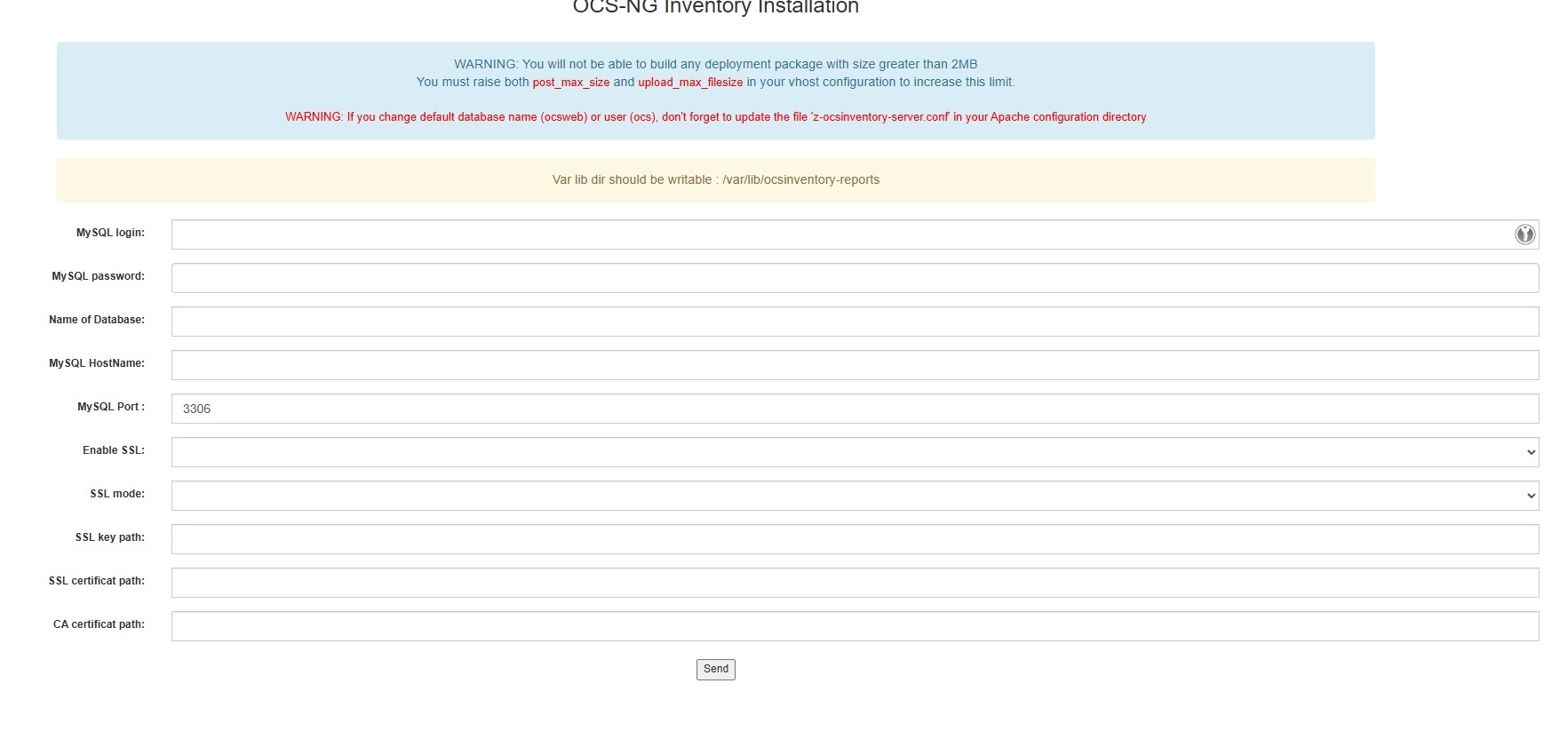
I enter the database information. Internal Server Error.
Dig through the Apache logs. The Perl module cannot connect to MariaDB. Check the configuration file z-ocsinventory-server.conf and….. darn:
PerlSetVar OCS_DB_PWD ocs
The default password was still in place. The installation script hadn’t updated it despite the responses. Fixed it manually, restarted Apache. This time it works.
> Note: After installation, always verify that the password in z-ocsinventory-server.conf matches what you entered.
This time the form goes through and we finally get the confirmation:
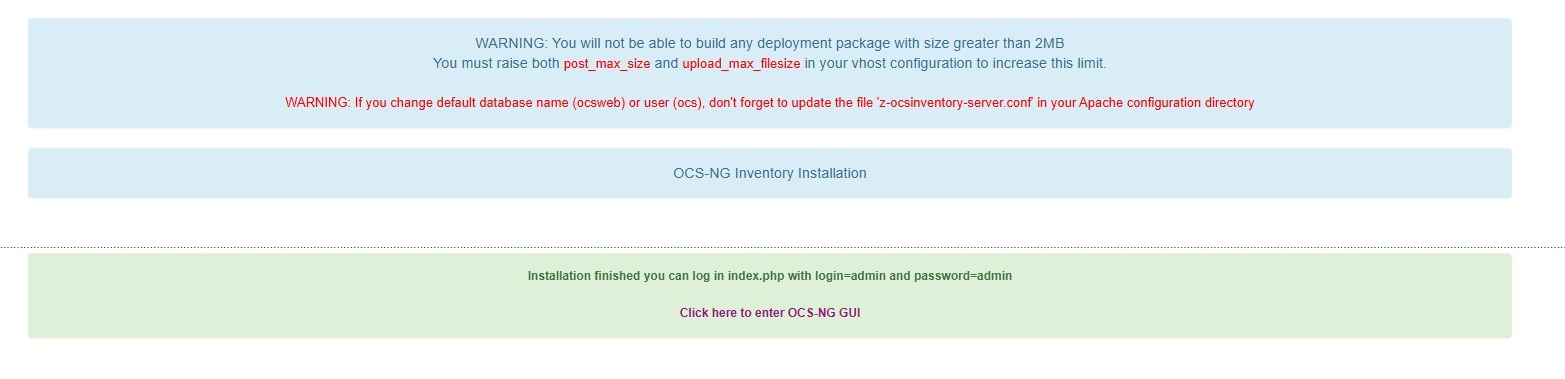
Clicking on the link, surprise—a screen for updating the database schema. Many people panic when they see this, but it’s completely normal:

Click "Perform the update" and you’ll access the interface. The first thing you see:
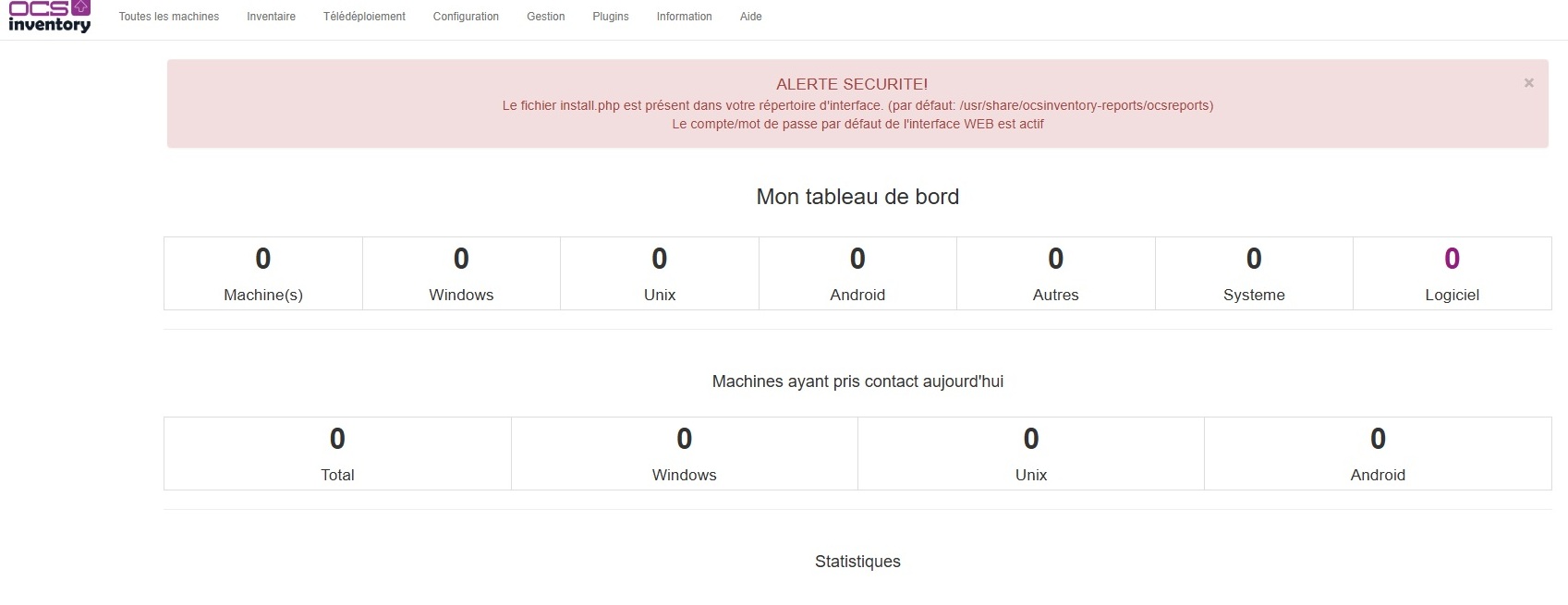
Two immediate security alerts: delete install.php and change the default admin password. Once that’s taken care of, we move on to deploying the Windows agents.
Act 3 — The Windows Agent, or “The Packager That Doesn’t Package”
On the Windows client side, OCS offers a tool called OCS Packager (which is actually called Packager-for-Windows on GitHub, fun fact). The idea is appealing: you give it the installer, the CA certificate, and the connection settings, and it generates an all-in-one executable ready to be deployed via GPO.
In theory.
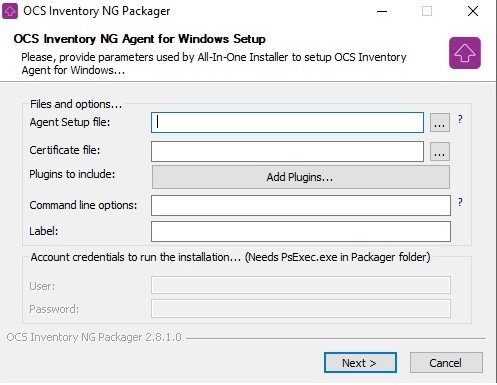
In practice, the generated executable completely ignored the configured settings and continued to point to http://ocsinventory-ng/ocsinventory—the hard-coded default address. Restarted the Packager, checked the options, same result.
Abandoned the Packager and opted for a more direct approach: a GPO batch file that installs the agent, overwrites the ocsinventory.ini file with the correct configuration, and copies the CA certificate to the correct location.
@echo off
if exist "C:\Program Files\OCS Inventory Agent\OCSInventory.exe" goto config

\\server\deploy$\OCS\OCS-Windows-Agent-Setup-x64.exe /S /NOTRAY
timeout /t 10

:config
net stop "OCS Inventory Service"
copy /Y \\server\deploy$\OCS\ocsinventory.ini "C:\ProgramData\OCS Inventory NG\Agent\ocsinventory.ini"
copy /Y \\server\deploy$\OCS\ca.cert.pem "C:\ProgramData\OCS Inventory NG\Agent\cacert.pem"
net start "OCS Inventory Service"

:end
exit
Rustic. Effective.
Act 4 — The cacert.pem, or "the killer detail"
The agent installed, the correct configuration in place… and still nothing showing up in the console.
Upon investigation, the cacert.pem file was simply not present in the agent directory. Without this file, the agent refuses the HTTPS connection—which makes sense—but without clearly stating so.
Once the certificate was copied manually, the machine appeared in the console within seconds.
That’s exactly why the batch script now copies both files: ocsinventory.ini and cacert.pem.
Act 5 — Linux Servers, or "Thanks, Ansible"
For Linux servers, there’s no question of wrestling with GPOs and batch files. There’s already an Ansible playbook that runs twice a week to update all the servers—NTP, packages, HTML reports via email. I simply added the OCS tasks to it.
The idea: install the ocsinventory-agent package, drop the CA certificate, overwrite the configuration with the correct parameters, and run an immediate inventory if it’s a new installation. All of this is integrated into the existing workflow, with an “installed / already present” status in the HTML report.
Before running the playbook, you need to copy the CA certificate to the Ansible server:
mkdir -p /etc/ansible/files
scp user@serveur-ocs:/etc/ssl/ocs/ca.cert.pem /etc/ansible/files/
Here is the complete playbook with the integrated OCS tasks:
---
- name: Configure NTP server, time zone, and update packages
hosts: servers
become: true
become_user: root
tasks:
# --- Set the time zone ---
- name: Set the time zone to Europe/Paris
community.general.timezone:
name: Europe/Paris
register: timezone_set
when: inventory_hostname not in ['kronoss', 'demeter']
# --- Chrony management ---
- name: Ensure Chrony is installed
ansible.builtin.apt:
name: chrony
state: present
register: chrony_installed
when: inventory_hostname != 'kronoss'
- name: Deploy the chrony.conf configuration
ansible.builtin.copy:
dest: /etc/chrony/chrony.conf
content: |
server 192.168.x.x iburst prefer
server 192.168.x.x iburst
keyfile /etc/chrony/chrony.keys
driftfile /var/lib/chrony/chrony.drift
ntsdumpdir /var/lib/chrony
logdir /var/log/chrony
maxupdateskew 100.0
rtcsync
makestep 1 3
leapsectz right/UTC
backup: yes
register: chrony_config_changed
when: inventory_hostname not in ['kronoss', 'demeter']
- name: Restart the Chrony service
ansible.builtin.systemd:
name: chronyd
state: restarted
enabled: yes
register: chrony_service_restarted
when: inventory_hostname not in ['kronoss', 'demeter']
- name: Check NTP synchronization
ansible.builtin.command:
cmd: chronyc tracking
register: ntp_status
changed_when: false
# --- OCS Inventory agent installation ---
- name: Install the OCS Inventory agent
ansible.builtin.apt:
name: ocsinventory-agent
state: present
register: ocs_installed
- name: Create the OCS configuration directory
ansible.builtin.file:
path: /etc/ocsinventory
state: directory
mode: '0755'
- name: Copy the CA certificate for OCS
ansible.builtin.copy:
src: /etc/ansible/files/ca.cert.pem
dest: /etc/ocsinventory/cacert.pem
mode: '0644'
- name: Deploy the OCS configuration
ansible.builtin.copy:
dest: /etc/ocsinventory/ocsinventory-agent.cfg
content: |
server=https://serveur-ocs.domaine.local/ocsinventory
ssl=1
ca=/etc/ocsinventory/cacert.pem
logfile=/var/log/ocsinventory-agent/ocsinventory-agent.log
debug=0
backup: yes
- name: Run an immediate inventory if newly installed
ansible.builtin.command:
cmd: ocsinventory-agent --force
changed_when: false
when: ocs_installed.changed
# --- Package updates ---
- name: Update the package list
ansible.builtin.apt:
update_cache: yes
cache_valid_time: 3600
register: apt_update_result
- name: Perform a full package update
ansible.builtin.apt:
upgrade: full
autoremove: yes
autoclean: yes
register: apt_upgrade_result
# --- Reboot management (information only) ---
- name: Check if a reboot is required
ansible.builtin.stat:
path: /var/run/reboot-required
register: reboot_required
# --- Disk space check (70% threshold) ---
- name: Check disk space on each server
ansible.builtin.shell: >
df -h --output=source,pcent,target | tail -n +2 |
grep -v tmpfs | grep -v udev |
awk -F'[% ]+' '$2 >= 70 {print $1"|"$2"|"$3}'
register: disk_check
changed_when: false
# --- SSL certificate check (30-day threshold) ---
- name: Check SSL certificate expiration
ansible.builtin.shell: |
for cert in /etc/letsencrypt/live/*/cert.pem; do
domain=$(echo $cert | cut -d'/' -f5)
expiry=$(openssl x509 -enddate -noout -in $cert | cut -d'=' -f2)
expiry_epoch=$(date -d "$expiry" +%s)
now_epoch=$(date +%s)
days_left=$(( ($expiry_epoch - $now_epoch) / 86400 ))
echo "$domain|$days_left"
done
register: ssl_check
changed_when: false
delegate_to: web-server
run_once: true
# --- Building the global summary message in HTML ---
- name: Build the global summary message
ansible.builtin.set_fact:
recap_message: |
<html>
<body style="font-family: Arial, sans-serif; background-color: #f4f4f4; padding: 20px;">
<div style="max-width: 800px; margin: auto; background: white; border-radius: 8px; padding: 20px; box-shadow: 0 2px 4px rgba(0,0,0,0.1);">
<h2 style="color: #2c3e50; border-bottom: 2px solid #3498db; padding-bottom: 10px;">
🖥️ Ansible Update Report
</h2>
<p style="color: #7f8c8d;">Run on {{ ansible_date_time.date }} at {{ ansible_date_time.time }}</p>
{% for host in ansible_play_hosts %}
<div style="margin-top: 20px; border: 1px solid #ddd; border-radius: 6px; overflow: hidden;">
<div style="background-color: #3498db; color: white; padding: 10px 15px;">
<h3 style="margin: 0;">{{ host | upper }}</h3>
</div>
<table style="width: 100%; border-collapse: collapse;">
<tr style="background-color: #f9f9f9;">
<td style="padding: 8px 15px; border-bottom: 1px solid #eee; width: 60%;">Time zone (Europe/Paris)</td>
<td style="padding: 8px 15px; border-bottom: 1px solid #eee;">
{% if hostvars[host].timezone_set.changed %}
<span style="color: #e67e22;">⚠️ CHANGED</span>
{% else %}
<span style="color: #27ae60;">✅ OK</span>
{% endif %}
</td>
</tr>
<tr>
<td style="padding: 8px 15px; border-bottom: 1px solid #eee;">Chrony</td>
<td style="padding: 8px 15px; border-bottom: 1px solid #eee;">
{% if hostvars[host].chrony_installed.changed %}
<span style="color: #e67e22;">⚠️ INSTALLED</span>
{% else %}
<span style="color: #27ae60;">✅ PRESENT</span>
{% endif %}
</td>
</tr>
<tr style="background-color: #f9f9f9;">
<td style="padding: 8px 15px; border-bottom: 1px solid #eee;">NTP configuration</td>
<td style="padding: 8px 15px; border-bottom: 1px solid #eee;">
{% if hostvars[host].chrony_config_changed.changed %}
<span style="color: #e67e22;">⚠️ CHANGED</span>
{% else %}
<span style="color: #27ae60;">✅ OK</span>
{% endif %}
</td>
</tr>
<tr>
<td style="padding: 8px 15px; border-bottom: 1px solid #eee;">OCS Inventory Agent</td>
<td style="padding: 8px 15px; border-bottom: 1px solid #eee;">
{% if hostvars[host].ocs_installed.changed %}
<span style="color: #3498db;">🔄 INSTALLED</span>
{% else %}
<span style="color: #27ae60;">✅ PRESENT</span>
{% endif %}
</td>
</tr>
<tr style="background-color: #f9f9f9;">
<td style="padding: 8px 15px; border-bottom: 1px solid #eee;">Package Update</td>
<td style="padding: 8px 15px; border-bottom: 1px solid #eee;">
{% if hostvars[host].apt_upgrade_result.changed %}
<span style="color: #3498db;">🔄 COMPLETED</span>
{% else %}
<span style="color: #27ae60;">✅ UP TO DATE</span>
{% endif %}
</td>
</tr>
<tr style="background-color: #f9f9f9;">
<td style="padding: 8px 15px; border-bottom: 1px solid #eee;">Reboot Required</td>
<td style="padding: 8px 15px; border-bottom: 1px solid #eee;">
{% if hostvars[host].reboot_required.stat.exists %}
<span style="color: #e74c3c;">🔴 YES</span>
{% else %}
<span style="color: #27ae60;">✅ NO</span>
{% endif %}
</td>
</tr>
<tr>
<td style="padding: 8px 15px;">Disk space (>70%)</td>
<td style="padding: 8px 15px;">
{% set disk_issues = [] %}
{% for line in hostvars[host].disk_check.stdout_lines %}
{% set parts = line.split('|') %}
{% if parts | length == 3 %}
{% set _ = disk_issues.append(parts) %}
{% endif %}
{% endfor %}
{% if disk_issues | length > 0 %}
{% for d in disk_issues %}
<span style="color: #e74c3c;">🔴 {{ d[0] }} → {{ d[1] }}% ({{ d[2] }})</span><br>
{% endfor %}
{% else %}
<span style="color: #27ae60;">✅ OK</span>
{% endif %}
</td>
</tr>
</table>
</div>
{% endfor %}
<!-- Section SSL -->
<div style="margin-top: 30px; border: 1px solid #ddd; border-radius: 6px; overflow: hidden;">
<div style="background-color: #8e44ad; color: white; padding: 10px 15px;">
<h3 style="margin: 0;">🔒 SSL Certificates</h3>
</div>
<table style="width: 100%; border-collapse: collapse;">
<tr style="background-color: #f0f0f0; font-weight: bold;">
<td style="padding: 8px 15px; border-bottom: 1px solid #eee; width: 60%;">Domain</td>
<td style="padding: 8px 15px; border-bottom: 1px solid #eee;">Days remaining</td>
</tr>
{% for line in ssl_check.stdout_lines %}
{% set parts = line.split('|') %}
{% if parts | length == 2 %}
{% set days = parts[1] | int %}
<tr style="background-color: {% if days <= 30 %}#fdf2f2{% else %}#f9f9f9{% endif %};">
<td style="padding: 8px 15px; border-bottom: 1px solid #eee;">{{ parts[0] }}</td>
<td style="padding: 8px 15px; border-bottom: 1px solid #eee;">
{% if days <= 30 %}
<span style="color: #e74c3c; font-weight: bold;">🔴 {{ days }} days — URGENT RENEWAL</span>
{% elif days <= 60 %}
<span style="color: #e67e22;">⚠️ {{ days }} days</span>
{% else %}
<span style="color: #27ae60;">✅ {{ days }} days</span>
{% endif %}
</td>
</tr>
{% endif %}
{% endfor %}
</table>
</div>
<p style="color: #95a5a6; font-size: 12px; margin-top: 20px; text-align: center;">
Automatically generated by Ansible
</p>
</div>
</body>
</html>run_once: true
# --- Sending a single summary email (in HTML) ---
- name: Send a single summary email
ansible.builtin.mail:
host: mail-server.domain.local
port: 25
to: "admin@domaine.local"
subject: "Ansible Update Report - {{ ansible_date_time.date }}"
body: "{{ recap_message }}"
from: "ansible@serveur-ansible.domaine.local"
secure: never
subtype: html
run_once: true
delegate_to: localhost
The result: the next time the cron job runs, all Linux servers install the agent, report their inventory, and the email report correctly indicates "INSTALLED" or "PRESENT" for each one.
What Works in the End
- OCS server running HTTPS with a certificate signed by the internal CA
- Windows agents deployed via GPO with automatic configuration
- Linux agents deployed via Ansible
- All machines report their full inventory: CPU, RAM, disks, software, IP, MAC
The final result is clean. The path to get there was much less so.
Lessons Learned
- Check the password in
z-ocsinventory-server.confafter installation — the password is in plain text there; restrict permissions immediately afterward:sudo chmod 640 /etc/apache2/conf-available/z-ocsinventory-server.conf sudo chown root:www-data /etc/apache2/conf-available/z-ocsinventory-server.conf - Do not rely on the Packager to propagate settings — overwrite the
.inifile directly - Always copy
cacert.pemto the HTTPS agent directory XML::Entitiesis not in the Ubuntu 24.04 repositories — usecpanto install it