A reader asked me to write an article “about Wi-Fi in general.” The topic is vast, so I decided to approach it from an angle that would resonate with anyone studying the TSSR: the OSI model.
Wi-Fi is Ethernet without the cable. Same MAC addressing, same frames, same network stack on top. Except that by removing the cable, we lose everything it offered for free: a private, silent medium where collisions are instantly visible. 802.11 is, at its core, just a set of mechanisms invented to compensate for this loss.
> The Essentials in 30 Seconds > - Wi-Fi (IEEE 802.11) occupies the same OSI layers as Ethernet (802.3): Layer 1 (physical) and Layer 2 (data link). It is the wireless counterpart to the articles on RJ45 and MAC addresses. > - In wireless communications, it is not possible to detect a collision while transmitting. Therefore, we switch from CSMA/CD (where collisions are detected) to CSMA/CA (where collisions are avoided), with an ACK on every frame. > - The hidden node sometimes requires reserving the medium using RTS/CTS. > - Three bands: 2.4 GHz (long range, but congested—channels 1/6/11), 5 GHz (throughput, but DFS), 6 GHz (but only 480 MHz in France). > - Connecting involves a sequence: discovery → authentication → association → security.
Where Does Wi-Fi Fit in the OSI Model?
Wi-Fi is not a “separate layer.” It is a Layer 1 + Layer 2 technology, just like Ethernet.
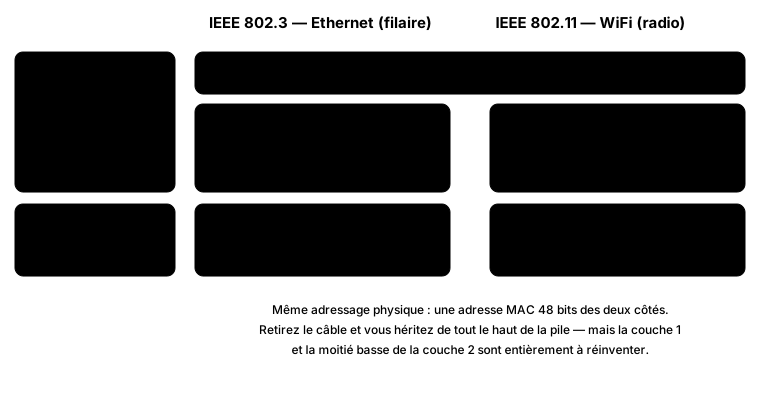
802.11 and 802.3 share the LLC sublayer but diverge at the MAC and physical layers.
Above that, everything is the same: Layer 3 (IP), Layer 4 (TCP/UDP), and the rest don’t even know whether the packet was sent via a cable or over the air. Where they diverge is at the bottom:
| Ethernet (802.3) | Wi-Fi (802.11) | |
|---|---|---|
| Layer 2 — media access | CSMA/CD | CSMA/CA |
| Layer 1 — media | copper / fiber | 2.4 / 5 / 6 GHz waves |
| Duplex | full-duplex | half-duplex, always |
| Medium | private | shared |
| Collision | detectable | undetectable by the transmitter |
Remember the last line. Everything else follows from it.
Layer 1: Radio—the Cable You Can’t See
In Ethernet, Layer 1 is copper: a private medium where the signal goes from point A to point B, and nowhere else. In Wi-Fi, it’s a volume of air shared with your neighbors, your microwave, and the baby monitor upstairs. You don’t choose who is listening, only which frequency you’re using.
2.4 GHz. It has a long range and penetrates walls well, but it’s narrow and crowded. In Europe, channels 1 through 13 overlap significantly.
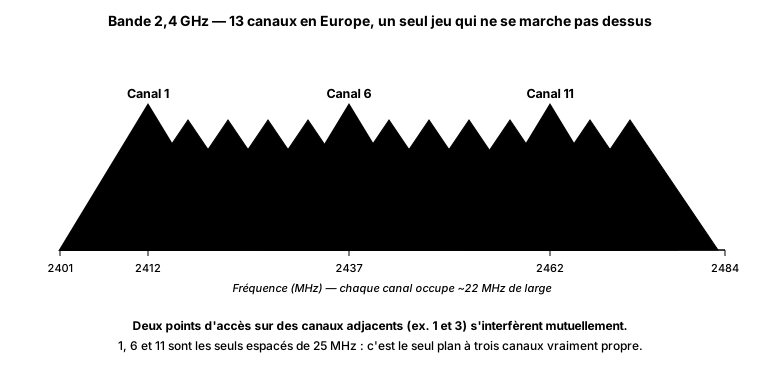
Only 1, 6, and 11 are spaced far enough apart to avoid overlap.
Hence the classic 1 / 6 / 11 strategy. Setting up an AP on channel 3 “because it seems open” doesn’t free up any spectrum: it overlaps with both 1 and 6, degrading performance on both.
5 GHz. Many more channels, so fewer users, and the ability to aggregate (40, 80, 160 MHz) to increase throughput. On the downside: shorter range, and DFS on part of the band—the AP shares the spectrum there with priority radar systems and must clear the channel if it detects one. The result: outages lasting a few seconds that many admins spend hours trying to trace to other causes.
6 GHz (Wi-Fi 6E). The brand-new, uncontested band. But here’s a detail few articles mention: in France, we’re limited to just 480 MHz (5945–6425 MHz, opened by ARCEP in late 2021), compared to 1200 MHz in the United States. The practical implication for Wi-Fi 7 and its 320 MHz channels: in the European spectrum, only a single 320 MHz channel fits, compared to three in the U.S. Same hardware, different uses.
Layer 2: Speaking When No One Else Is Speaking
In switched Ethernet, the question of “who speaks when” no longer arises: every switch port is full-duplex. With Wi-Fi, we’ve gone back to the days of the hub—a single medium, one conversation at a time. So arbitration is necessary.
Ethernet uses CSMA/CD: you listen, you transmit, and if two stations collide, they hear the collision and fall silent. With radio, this is impossible: when a card transmits, its own transmission drowns out everything else. It is deaf while it’s talking.
Hence CSMA/CA—we no longer try to detect collisions, but to avoid them. The station listens, waits a random delay to avoid rushing onto the channel at the same time as another station, and then transmits. And most importantly: each frame is acknowledged with an ACK, because that’s the only way to know it arrived. No ACK = retransmission. This is one of the reasons why the actual throughput is far lower than the advertised throughput.
The Hidden Node
CSMA/CA assumes that “if I’m listening and it’s silent, no one is transmitting.” In wireless communications, this is not true: two stations can be within range of the same AP but out of range of each other. Both believe the channel is clear, transmit, and collide—but only at the AP, which neither of them can detect.
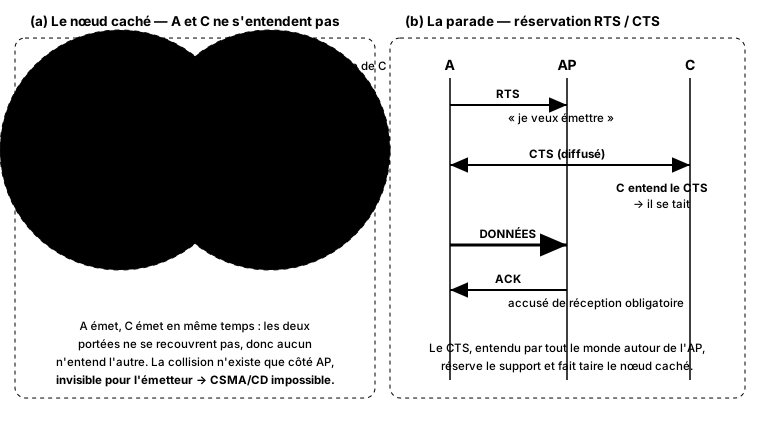
A and C cannot hear each other: the collision exists only on the AP side. RTS/CTS reserves the medium to prevent it.
The solution: RTS/CTS. The station requests the floor (RTS), and the AP responds with a CTS that everyone around it hears. The hidden node, which couldn’t hear the transmitter, hears the CTS and puts itself on hold. When you experience unexplained disconnections with scattered clients, this is the first thing to check.
Connecting: SSID, BSSID, and the Association Dance
Three acronyms that are constantly confused:
- SSID: the network name (“Livebox-1234”). What the user sees.
- BSSID: the MAC address of the radio on a specific AP.
- ESSID: multiple access points broadcasting the same SSID to cover a large area—this is what enables roaming.
And here’s the sequence—the one you need to know how to read in the analyzer:
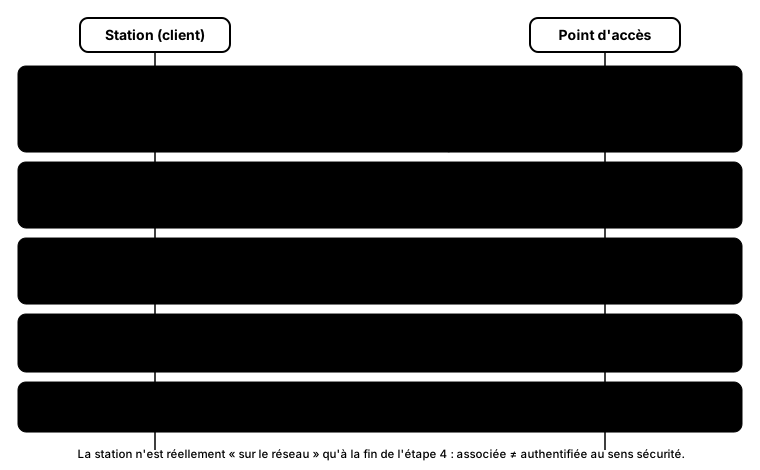
The station is not actually on the network until after the security handshake.
A terminology pitfall: the “802.11 authentication” in step 2 is a relic that doesn’t verify anything in Open System mode. True authentication is the WPA2/WPA3 handshake in step 4. A station can therefore be “associated” without anything being encrypted: associated ≠ authenticated in the security sense.
What about WiFi generations 4, 5, 6, 7… 8?
I’ve barely mentioned them, and that’s intentional: these generations (802.11n/ac/ax/be/bn) are all about Layer 1—modulations, channel widths, antennas—and they deserve their own article. A quick overview: Wi-Fi 7 (802.11be) was ratified in 2024 and is currently the mature standard; Wi-Fi 8 (802.11bn, Ultra High Reliability) had its first prototypes showcased at CES 2026, with ratification expected around 2028, marking a clear shift—for the first time, a generation isn’t focused on higher throughput, but on greater reliability. I’ll revisit this in a dedicated article.
Common Mistakes
- A 2.4 GHz channel other than 1, 6, or 11. An “intermediate” channel only adds noise to two bands at once.
- A 40 MHz channel width at 2.4 GHz. It consumes almost the entire band for an illusory gain. 40 MHz and above are for the 5 and 6 GHz bands.
- Increasing the AP’s power to “extend coverage.” The client will receive the AP’s signal better, but the AP won’t receive the client’s signal any better: the connection appears to be connected but is sluggish. Good coverage means more APs operating at moderate power, not a single AP blasting at full power.
- Confusing “associated” with “secure.” Nothing is encrypted until the WPA2/WPA3 handshake is complete.
What I’ve Learned
Wi-Fi isn’t some exotic technology sitting alongside the wired network: it’s the same network at Layers 1 and 2, just without the convenience of a cable. Everything that complicates it is there only to recreate what a strand of copper once offered effortlessly: a reliable medium where we know who is speaking and when. When a Wi-Fi connection stalls, the right question is almost never “Is it working?” but rather “Who else is talking on this channel, and can my devices hear each other?”
Sources
- IEEE 802.11, the reference standard for Wi-Fi (physical and MAC layers) — IEEE 802.11 Working Group.
- ARCEP, Decision No. 2021-2184 of October 14, 2021, opening the 5945–6425 MHz band to Wi-Fi 6E in France — Légifrance.
- Wi-Fi Alliance, generation names and certification — wi-fi.org.
- IEEE 802.11bn (Ultra High Reliability / Wi-Fi 8), status and objectives — Wikipedia: IEEE 802.11bn.