In the first article in this series, we took a look under the hood of Wi-Fi: Layers 1 and 2, CSMA/CA, the hidden node, and the underlying architecture. This is useful for understanding how it works, but that’s never the question I get asked. The real questions—the ones from a reader who wants to set up a network or secure their network—are two: “ What should I get in 2026?” and “Is it really secure?”. That’s the focus of this second installment.
> The Essentials in 30 Seconds > - The generations (Wi-Fi 4 through 8) are all about Layer 1: each adds a band or a channel width. Wi-Fi 8 breaks with the race for throughput to focus on reliability. > - In 2026, the sweet spot for deployment will be Wi-Fi 6/6E (mature, WPA3 required); Wi-Fi 7 if the hardware and clients are ready. > - Security has its own timeline, independent of generations: WEP → WPA → WPA2 → WPA3. > - WPA2 remains secure if the password is strong, but its handshake can be captured and cracked offline. > - WPA3 (SAE + PMF required) blocks the two most common attacks.
The Generations, Without the Specs
People tend to reduce generations to a single speed number on a box. That’s the best way to make a bad purchase. What matters is what each one has actually changed.
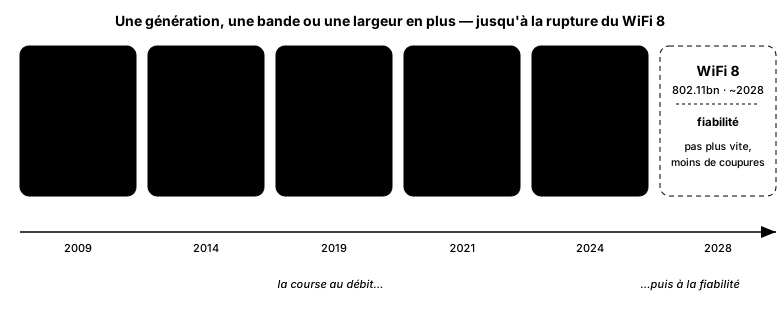
Each generation adds a band or a channel width—until Wi-Fi 8 breaks the mold.
Wi-Fi 4 (802.11n) introduced MIMO, which uses multiple antennas in parallel. Wi-Fi 5 (802.11ac) focused on the 5 GHz band and wide channels. Wi-Fi 6 (802.11ax) takes a different approach: its key feature isn’t raw throughput but density—OFDMA allows for the efficient servicing of many clients at the same time, which matters far more in a crowded room than the theoretical peak speed. Wi-Fi 6E is simply Wi-Fi 6 extended to the 6 GHz band. Wi-Fi 7 (802.11be, ratified in 2024) expands channel widths to 320 MHz and introduces MLO, the ability to aggregate two bands simultaneously. Wi-Fi 8 (802.11bn), expected around 2028, won’t aim for higher speeds: it focuses on reliability—lower peak latency and fewer dropouts while on the move.
So, what about 2026? The right question is almost never “what’s the data rate?” but “how many simultaneous clients, and in what environment?” For today’s deployments, Wi-Fi 6 / 6E strikes the right balance: it’s mature, widely available, and mandates WPA3. Wi-Fi 7 makes sense only if the hardware is new and the clients are compatible; otherwise, you’re paying for MLO that no one uses. And for heaven’s sake, don’t replace equipment that’s holding up just for a higher number.
Security: From a Sieve to a Safe
Here’s the point many people miss: security doesn’t follow generational cycles. It has its own timeline, and a WiFi 6 access point can very well be configured incorrectly. Four steps.
WEP is a sieve. Cracked since the early 2000s, it can be breached in minutes using off-the-shelf tools. If it’s still in use anywhere on your network, it’s an emergency—not a choice.
WPA was a patch (TKIP) applied to existing WEP hardware to bridge the transition period. It, too, is obsolete.
WPA2 (AES-CCMP) has been the de facto standard for fifteen years, and it remains secure—on one condition: that the password is strong. Because its weakness isn’t the encryption; it’s the handshake. We’ll come back to that in a moment.
WPA3 (2018) specifically addresses this issue with two mechanisms. SAE (Simultaneous Authentication of Equals) replaces WPA2’s vulnerable key exchange: it renders offline dictionary attacks ineffective, since each password attempt now requires interaction with the network. And PMF (802.11w, Protected Management Frames), which is mandatory in WPA3, protects management frames—the very ones that were used to kick clients off the network. WPA3 is also required for Wi-Fi 6E certification: in the 6 GHz band, neither WEP, WPA2, nor traditional open networks are permitted.
How Wi-Fi Is Actually Hacked
Understanding the attack means understanding why WPA3 exists. Here is the classic attack chain against a personal WPA2 network.
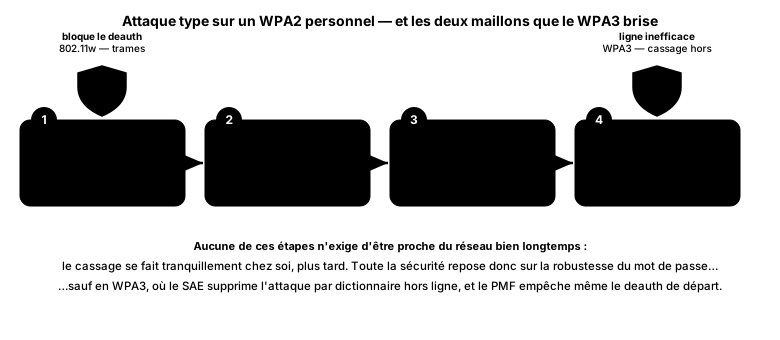
PMF blocks the initial deauthentication; SAE renders offline cracking ineffective.
In WPA2, management frames are unsigned: the attacker forges a deauthentication frame and kicks a client off the network at will. The client immediately reconnects and re-performs the handshake—which the attacker then simply captures. From that point on, there’s no need to be on-site: the crack is performed offline, quietly, by testing millions of passwords on the attacker’s own machine. An even more stealthy variant is the PMKID attack: the attacker retrieves the information directly from the access point, without even waiting for a client to connect.
Ultimately, the entire security of WPA2-Personal rests on the strength of the password. WPA3 changes the game: SAE eliminates offline cracking, and PMF even prevents the initial deauthentication. It’s no coincidence that these are the two links marked in green in the diagram.
There remains one attack that neither WPA2 nor WPA3 can handle on its own: the evil twin, a fake access point that broadcasts your SSID to intercept connections. In this case, it’s not the encryption that’s the problem, but the user connecting to the wrong network—and no protocol can fully fix that.
Common Mistakes
- Leaving WEP, WPA, or TKIP enabled “for compatibility.” If even one weak mode is enabled, the entire network can be downgraded to that mode. Disable them.
- A weak PSK password. In WPA2, this is the only real line of defense: “Livebox2024” can be cracked offline in just a few minutes.
- Not enabling PMF when it’s optional (on 2.4 and 5 GHz, WPA2). Enable it: that’s what prevents deauthentication attacks.
- Believing that a hidden SSID provides protection. It hides nothing from eavesdroppers and just makes life harder for your own clients.
- Relying on MAC address filtering. A MAC address can be spoofed with a single command—see the Layer 2 article.
- Leaving WPS enabled. Its PIN can be cracked via brute force; it negates the value of a strong password.
Key Takeaways
Wi-Fi generation and Wi-Fi security are two separate areas that are too often confused. Generation is about convenience: device density, throughput, and latency. Security is a different timeline, with its own logic and pitfalls. In 2026, the sensible approach can be summed up in one sentence: deploy Wi-Fi 6/6E (or 7 if your network infrastructure supports it), switch to WPA3 as soon as your clients allow it—in transition mode if necessary— enable PMF, choose a long password, and banish WEP and WPS. The rest is just marketing on a box.
Sources
- Wi-Fi Alliance, WPA3 specification and Wi-Fi CERTIFIED program (SAE, PMF, Enhanced Open) — wi-fi.org.
- IEEE 802.11, reference standard, including 802.11w (Protected Management Frames) — IEEE 802.11 Working Group.
- PMKID attack (clientless capture), Jens Steube / hashcat, 2018 — hashcat.net.
- KRACK (Key Reinstallation Attacks against WPA2), M. Vanhoef, 2017 — krackattacks.com.